
Introduction#
LVGL Pro lets you design UI components visually in the editor, but some effects need runtime logic that goes beyond styling. This tutorial walks through building a custom widget that implements a translate-on-scroll effect, where list items shift horizontally based on their scroll position to create a wheel-like UI.
You will define the widget in XML, export the generated C code, and wire up a scroll event callback to drive the visual effect.
The translate-on-scroll example shows how child elements can be repositioned dynamically during scrolling to create a curved or wheel-like visual effect.
Terminology#
Before starting, it's important to understand how LVGL Pro structures UI elements.
Built-in Widgets#
LVGL includes ready-made widgets such as lv_arc, lv_button, and lv_label.
- Available directly in the editor
- Require no custom implementation
Components#
Components are reusable UI blocks composed of one or more objects.
- Defined entirely in the editor
- Focused on layout and styling
- No custom C logic required
Widgets#
Widgets extend components with custom behavior implemented in C.
Use widgets when:
- Behavior cannot be achieved through styling alone
- You need event-driven or dynamic logic
Translate on scroll requires runtime calculations, making it a good candidate for a custom widget.
Translate on Scroll Overview#
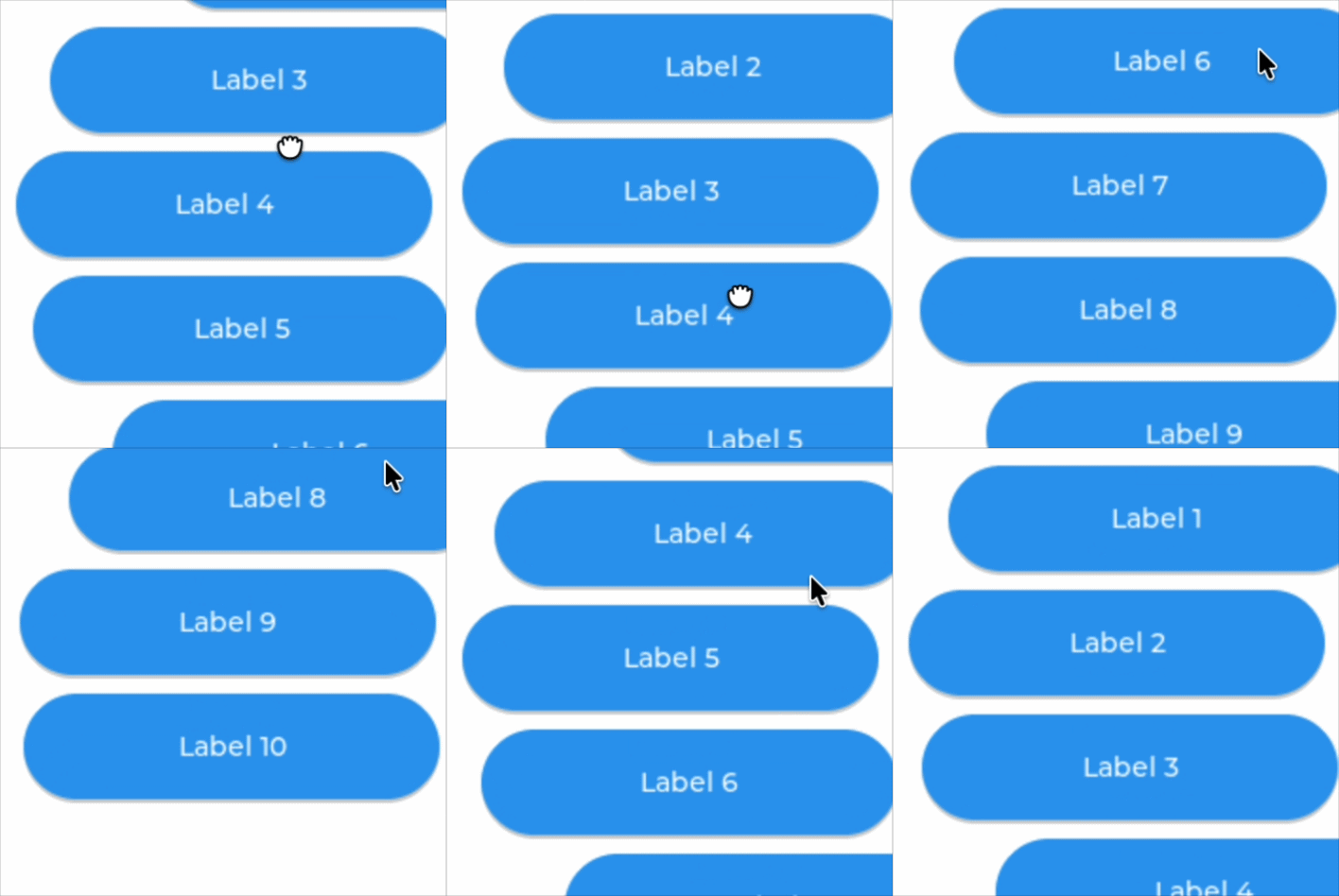
The translate on scroll effect makes a list behave like a wheel:
- Items shift horizontally based on their vertical position
- Items near the center appear more prominent
- The effect is updated continuously during scrolling
Create the Base Widget#
- Open LVGL Pro
- Create a new widget named
wd_list - Design your layout and apply styles as needed
Supporting Component: Button#
The scroll list uses a simple button component for each row. Define this component so it can be used as a child of the widget:
<component>
	<previews>
		<preview width="320" height="240" style_bg_color="0xeee" />
	</previews>
	<api>
		<prop name="label" type="string" default="Label 1" />
	</api>
	<styles>
		<style name="style_base" width="100%" pad_ver="20" radius="40" />
	</styles>
	<view extends="lv_button">
		<style name="style_base" />
		<lv_label text="$label" align="center" />
	</view>
</component>Define the Widget XML#
Create the widget structure and expose a configuration property.
<widget>
	<previews>
		<preview width="320" height="240" style_bg_color="0xeee" />
	</previews>
	<api>
		<prop name="translate_scroll" type="bool" default="false" />
	</api>
	<styles>
		<style
			name="style_base"
			width="100%"
			height="100%"
			pad_all="10"
			pad_row="10"
			layout="flex"
			flex_flow="column"
		/>
	</styles>
	<view extends="lv_obj" scrollbar_mode="off">
		<style name="style_base" />
	</view>
</widget>The translate_scroll property allows the effect to be enabled or disabled without changing the implementation.
Export Generated Code#
Use Export Code only in LVGL Pro to generate the widget files:
- wd_list.cCustom logic goes here
- wd_list.h
- wd_list_gen.cAuto-generated, do not edit
- wd_list_gen.hAuto-generated, do not edit
- wd_list_private_gen.hAuto-generated, do not edit
- wd_list_xml_parser.c
Files ending in _gen.* are overwritten during export. Always add custom logic in wd_list.c.
Implement the Scroll Logic#
Add the scroll event callback that calculates horizontal translation for each child based on its distance from the container center:
static void scroll_event_cb(lv_event_t * e)
{
    lv_obj_t * cont = lv_event_get_target_obj(e);

    lv_area_t cont_a;
    lv_obj_get_coords(cont, &cont_a);
    int32_t cont_y_center = cont_a.y1 + lv_area_get_height(&cont_a) / 2;

    int32_t r = lv_obj_get_height(cont) * 7 / 10;
    int32_t child_cnt = (int32_t)lv_obj_get_child_count(cont);

    for(int32_t i = 0; i < child_cnt; i++) {
        lv_obj_t * child = lv_obj_get_child(cont, i);

        lv_area_t child_a;
        lv_obj_get_coords(child, &child_a);

        int32_t child_y_center = child_a.y1 + lv_area_get_height(&child_a) / 2;
        int32_t diff_y = LV_ABS(child_y_center - cont_y_center);

        int32_t x;

        if(diff_y >= r) {
            x = r;
        } else {
            uint32_t x_sqr = r * r - diff_y * diff_y;
            lv_sqrt_res_t res;
            lv_sqrt(x_sqr, &res, 0x8000);
            x = r - res.i;
        }

        lv_obj_set_style_translate_x(child, x, 0);
    }
}Attach the Event#
Attach the scroll callback and configure behavior:
void wd_list_constructor_hook(lv_obj_t *obj)
{
    wd_list_t * widget = (wd_list_t *)obj;
    lv_obj_add_event_cb(obj, scroll_event_cb, LV_EVENT_SCROLL, widget);
    lv_obj_add_event_cb(obj, scroll_event_cb, LV_EVENT_CHILD_CHANGED, widget);
    lv_obj_set_scroll_dir(obj, LV_DIR_VER);
}LV_EVENT_SCROLLupdates positions during scrollingLV_EVENT_CHILD_CHANGEDupdates layout when items are added or deleted- Scrolling is limited to vertical
Bind API Property#
Wire the translate_scroll XML property to the C implementation so it can be toggled from the editor.
XML Parser#
void wd_list_xml_apply(lv_xml_parser_state_t * state, const char ** attrs)
{
    void * item = lv_xml_state_get_item(state);

    lv_xml_obj_apply(state, attrs);

    for(int i = 0; attrs[i]; i += 2) {
        const char * name = attrs[i];
        const char * value = attrs[i + 1];
            if(lv_streq("translate_scroll", name)) {
                wd_list_set_translate_scroll(item, lv_xml_to_bool(value));
            }
    }
}Widget API#
void wd_list_set_translate_scroll(lv_obj_t * wd_list, bool translate_scroll)
{
    wd_list_t * widget = (wd_list_t *)wd_list;
    widget->translate_scroll = translate_scroll;
    lv_obj_send_event(wd_list, LV_EVENT_SCROLL, widget);
}Update the Callback#
Update scroll_event_cb to respect the translate_scroll property:
static void scroll_event_cb(lv_event_t * e)
{
    lv_obj_t * cont = lv_event_get_target_obj(e);
    wd_list_t * widget = (wd_list_t *)lv_event_get_user_data(e);

    /* ... same calculation as before ... */
    lv_obj_set_style_translate_x(child, x, 0);
    lv_obj_set_style_translate_x(child, widget->translate_scroll ? x : 0, 0);
    /* ... */
}Result#
Export the code from LVGL Pro and recompile your project. The widget can now be used in any XML layout:
Wrapping Up#
Custom widgets in LVGL Pro bridge the gap between visual design and runtime behavior. The key principles to keep in mind:
- Components handle static layout and styling. Use them when no custom logic is needed
- Widgets extend components with C callbacks for dynamic behavior
- Keep custom code in
wd_list.c. Never modify_gen.*files - Expose configurable behavior through XML API properties so it can be controlled from the editor