IDO-SMLCD72-V1-2EC is a powerful board with OpenWRT operating system, 1024x600 7-inch screen, and 1.2 GHz CPU.
Wireless-Tag IDO-SMLCD72 LVGL Demo
IDO-SMLCD72-V1-2EC is a 7-inch smart display motherboard based on SigmaStar SSD201/SSD202 SoC (ARM Cortex-A7 processor), with the main frequency up to 1.2 GHz with 256 KB L2-Cache. It comes with built-in dual MAC, one PHY, and supporting dual 100 MB Ethernet interfaces. It integrates H.264/AVC and H.265/HEVC decoders and supports max. resolution FHD (1920x1080) at 60 fps decode.
The board also has audio interface, speaker interface, USB 2.0 and WiFi. The manufacturer (Wireless-Tag) recommends this board for smart building indoor intercom, smart home central control, elevator floor display, IP network broadcasting device, or speech recognition equipment.
IDO-SMLCD72-V1-2EC earned the Professional LVGL board certification which means it's a top tier board with high performance, quality, and robustness.

Buy now#
The IDO-SMLCD72-V1-2EC board can be purchased from Alibaba.
Specification#
Power supply: USB-C (5V)
Performance#
IDO-SMLCD72-V1-2EC is a powerful computer with OpenWRT (Linux). Even without any GPU, using only the pure 1.2 GHz clock of the CPU, the FPS has never dropped below 60 during the benchmark. The driver uses the standard /dev/fb to simply copy the LVGL rendered image to the framebuffer.
The booting time is very good. The demo started in 8 seconds from power up.
Quality#
Display#
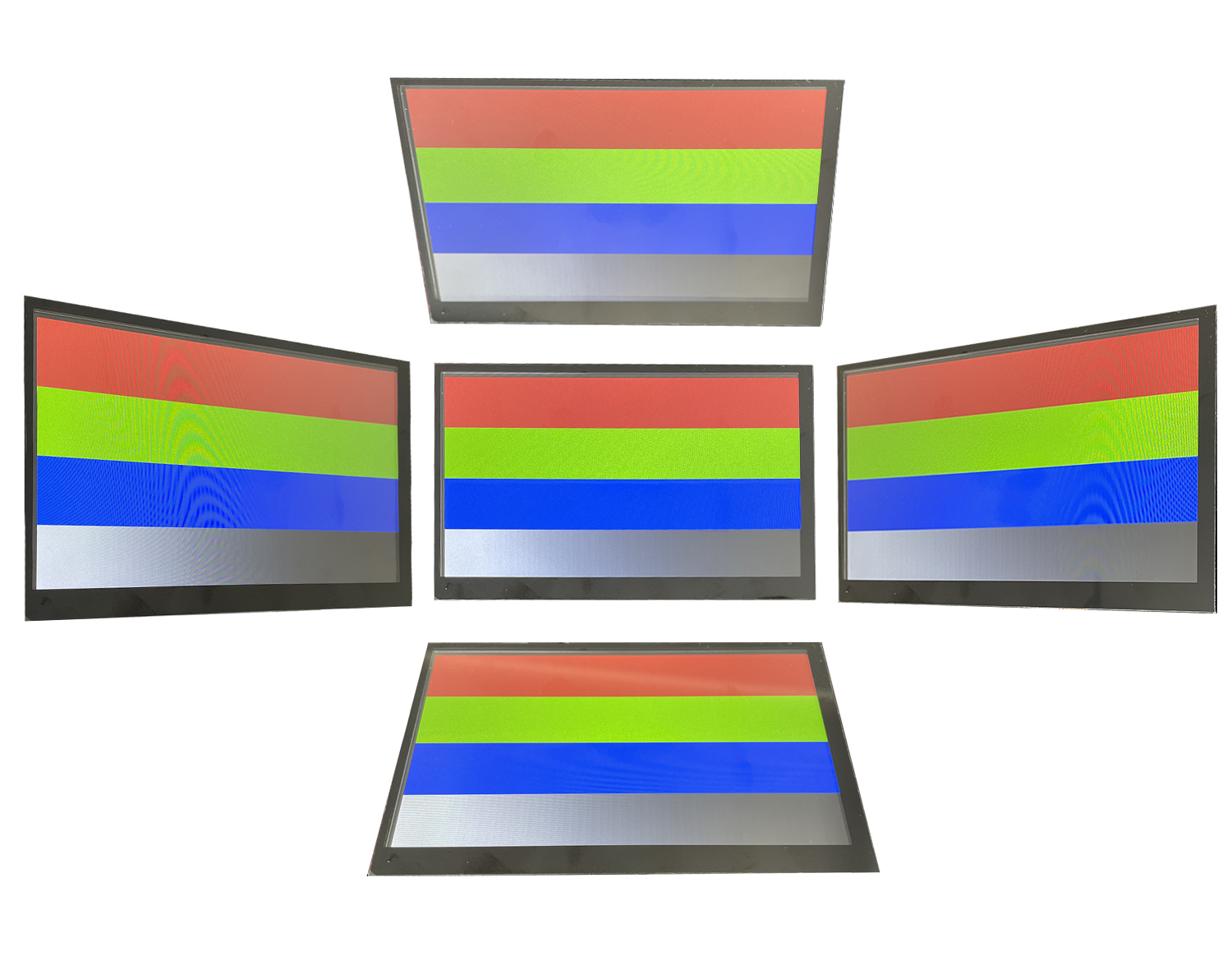
This board has a large beautiful display with great pixel density.
Touchpad#
IDO-SMLCD72-V1-2EC comes with a capacitive touchpad. Therefore it recognizes touches with good precision and provides a smartphone-like experience. The drawback is that the touchpad cannot be used with gloves or with a pen.
Robustness#
IDO-SMLCD72-V1-2EC is designed to be placed into an end product. It's massive and has many holes to mount the board.
Development#
On the products of Wireless-Tag you can develop in 2 different ways:
- Write code and build it (see Build and Deploy)
- Use their custom UI Editor tool called 8ms
Build and Deploy#
A getting started project can be found on GitHub.
The development instructions in the README are in Chinese, so we summarize them here.
Installation Dependencies#
Verified on Ubuntu 16.04.7 64-bit:
sudo apt-get install subversion build-essential libncurses5-dev zlib1g-dev gawk git ccache \
    gettext libssl-dev xsltproc libxml-parser-perl \
    gengetopt default-jre-headless ocaml-nox sharutils textinfo
sudo dpkg --add-architecture i386
sudo apt-get update
sudo apt-get install zlib1g:i386 libstdc++6:i386 libc6:i386 libc6-dev-i386Install Toolchain#
Download the toolchain from Google Drive.
Unzip the toolchain:
sudo tar -xvf wt-gcc-arm-8.2-2018.08-x86_64-arm-linux-gnueabihf.tar.gz -C /opt/Set environment variables by modifying the ~/.profile file. Add the following line to the end of the file:
PATH="/opt/gcc-arm-8.2-2018.08-x86_64-arm-linux-gnueabihf/bin:$PATH"Update the environment variables:
source ~/.profileTest the cross toolchain:
arm-linux-gnueabihf-gcc --versionGet and Build the Project#
git clone https://github.com/wireless-tag-com/8ms-sstar.git
cd 8ms-sstar
make -jDeploy#
You can use either the serial port or the Ethernet port to connect to the board.
We have used the Ethernet port via telnet:
telnet 192.168.1.1The password is admin.
After connecting, you can use all the normal Linux commands. To copy the built project to the board, we have used scp. On the development PC, use the following command to copy the created binary to the board's root folder:
scp ./bin/demo root@192.168.1.1:/Going back to the telnet session and issuing ./demo will start the demo.
If you place the demo in /usr/sbin, the demo will start automatically on startup.
8ms Editor#
Wireless-Tag's online editor is available at 8ms.xyz.
It's a drag-and-drop editor allowing you to create UIs without writing a single line of code. Besides easily putting together a UI, you can use Blockly to implement the business logic.
After signing up and logging in, click the red "Workbench" button on the right corner.

After that, click the "New" button on the right. Select "Sigmastar" and "SSD201+SPI NAND + CC0702I50R (1024x600)" hardware.
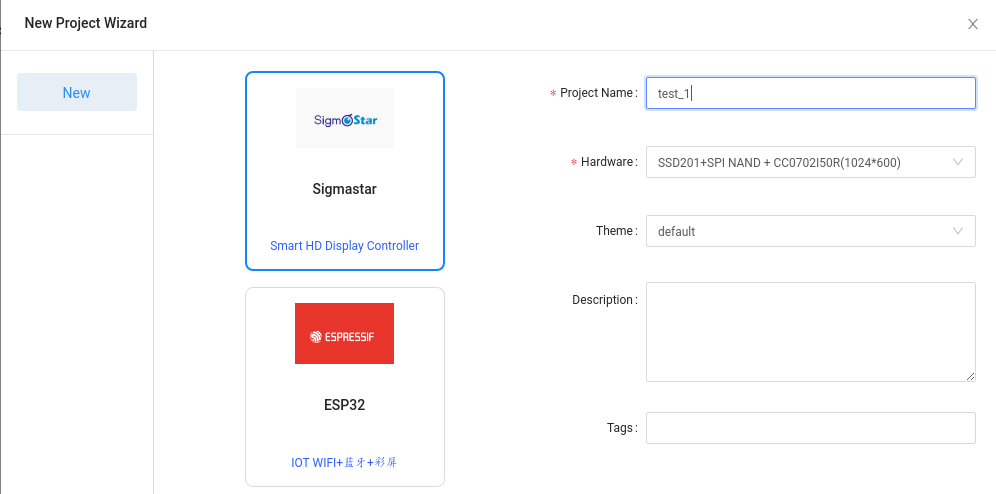
Click confirm and you are ready to play with the UI.
In the "Layout" menu you can select "Blockly" to add some logic too.
From the "Compile" menu you can download the binary, the source code, or start an online preview.
Conclusion#
IDO-SMLCD72-V1-2EC is an amazing board. Using OpenWRT (Linux), the development, deployment, and maintenance are very simple. Besides that, the performance and robustness of the board are also great.
Due to the 8ms editor, you don't need to be a professional developer to get started with this product.