The i.MX RT1050 EVK is a 4-layer through-hole USB-powered PCB. At its heart lies the i.MX RT1050 crossover MCU, featuring NXP's advanced implementation of the ARM Cortex-M7 core. This core operates at speeds up to 600 MHz to provide high CPU performance and great real-time response. Support for FreeRTOS is available within the MCUXpresso SDK. The i.MX RT1050 EVK board is now supported by ARM Mbed OS and Zephyr OS, both open-source embedded operating systems for developing the Internet of Things.
NXP i.MX RT1050 EVK LVGL Demo
i.MX RT1050 EVK earned Standard LVGL board certification which means the users can be sure that it's easy to use that board with LVGL and they can expect decent performance and quality.

Buy now#
The i.MX RT1050 EVK board can be purchased directly from NXP or its distributors. See here.
Specification#
Display Details#
- Resolution 480x272
- Display size 4.3"
- Color depth 16 bit, RGB565
- Technology TN
- DPI 128 px/inch
- Touch pad Resistive
- Brightness 350 cd/m²
Performance#
Frame rate (FPS)#
The MCU's 600 MHz clock speed and its ARM Cortex-M7 architecture are abundantly enough for the 480x272 display to create state-of-the-art UIs with image transformations, animations, opacity, and a lot of assets. i.MX RT1050 has PXP GPU that has built-in LVGL support. It can be simply enabled in lv_conf.h.
The MCU is equipped with an LCD controller to drive the display directly. Multiple frame buffers can be added to the board's external RAM and you can even add one to the MCU's internal RAM. From the frame buffer(s) the MCU automatically sends the current frame to the display.
The LCD controller supports maximum 1366x768 resolution which is about 8 times larger than the board's 480x272 display. The relation is not fully linear but if the UI has - for example - 50 FPS with 25% CPU usage on 480x272, it will have approximately 25 FPS with 100% CPU usage on 1366x768.
The board reached 33 FPS (the set limit) on the LVGL's certification benchmark. In the video you can see, that even the most complex transformations or scrolling the whole screen with all the animations were perfectly smooth. The benchmark used the display driver from the MCUXpresso's SDK as it is. The driver uses 2 frame buffers located in the external RAM. It's not the fastest solution because accessing the external RAM takes more time than accessing the internal RAM. Using a smaller draw buffer in internal RAM (where LVGL renders) and copying it to an external RAM framebuffer once is much faster. In the video below a driver like this is used:
Optimized frame buffer performance demo
Memory#
The i.MX RT1050 chip has plenty of internal RAM (512 KB) and external SDRAM (32 MB), has no internal flash but has 2 types of external flashes. Let's see what graphics configuration can work with these memories.
Only internal RAM#
The 512 KB internal RAM can be used to store the frame buffer directly. LVGL still needs 1 or 2 smaller (1/10 to 1/5 screen sized) draw buffers where rendering happens and these buffers' contents should be copied to the frame buffer. If the frame buffer is placed into the internal RAM, accessing the frame buffer will be very fast. Unfortunately, 2 frame buffers cannot fit into the internal RAM so this way "real double buffering" cannot be achieved. Hence some tearing might be visible but it needs to be tested with the concrete application.
Frame buffer(s) in external RAM#
The large external RAM makes possible to store 2 frame buffers and handle VSYNC (swap the frame buffers at the moment when the display is not being refreshed). No tearing will be visible with this solution. The draw buffers of LVGL still should be stored in internal RAM because:
- they are small and can fit easily into internal RAM
- they are read/written many times per pixel so it's important to keep memory access fast
Storing assets#
Images and fonts can be stored in 4 kinds of memories:
- Hyper flash: fast, non-volatile, and large
- QSPI flash: slower, non-volatile, and middle sized
- SD card: the slowest but can have a huge size
- External RAM: fast, volatile, and middle sized. If there are performance issues due to the memory bandwidth it's possible to load the assets from the SD card or external flash here during initialization.
Quality#
Display#
The display is built with TN technology so its viewing angle and color correctness are only average.
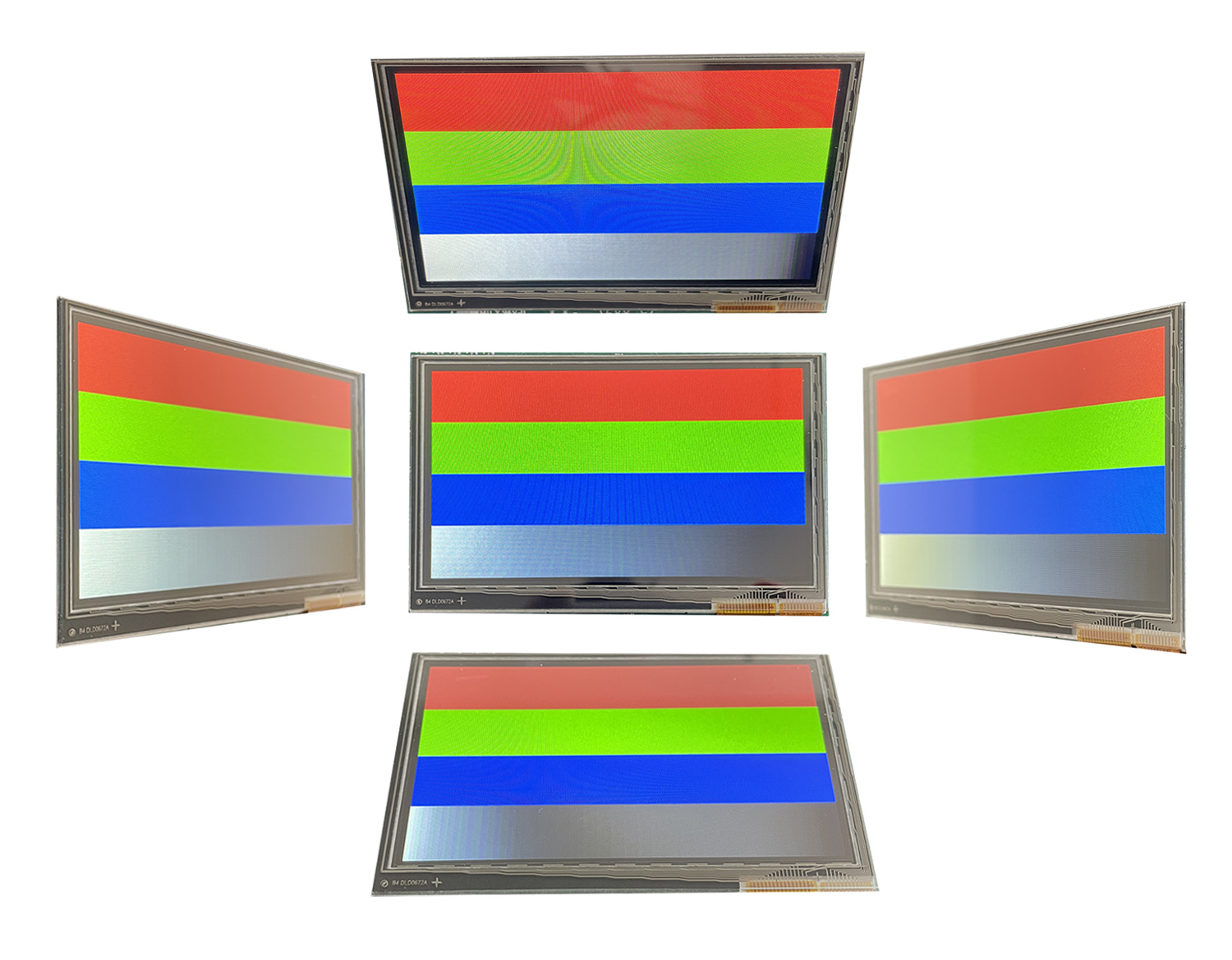
Touchpad#
i.MX RT1050-EVK is built with a resistive touchpad. Therefore it recognizes touch with a pen or in gloves. On the other hand customers might get used to the capacitive touchpads that are found in smartphones.
Robustness#
i.MX RT1050-EVK is a development board for evaluation and not designed to be added to an end-product. Although there are holes to mount the board but the display is not glued to the board.
For real life applications a secondary board might be required for sensors or other peripheries.
The schematic of the board is publicly available and it can be a good starting point to develop your custom board based on i.MX RT1050 EVK.
Development#
You can start to work with i.MX RT1050 EVK in many IDEs including MCUXpresso, Keil or IAR.
MBed OS and Zephyr also supports this board. To get started with MBed OS and Zephyr you can use their default IDE or tools or you can use PlatformIO as well.
Of course, NXP's MCUXpresso supports this board with plenty of ready-to-use examples and applications (including UI application with LVGL).
The board is equipped with programmer/debugger so all you need to do is connect the USB cable and hit the Run or Debug buttons. We have tested the board with MCUXpresso and the debug experiment was very smooth. The usual debug features of Eclipse were working well.
GUI Guider - a free UI Editor from NXP based on LVGL - also supports the i.MX RT1050 EVK board. You only need to download and install GUI Guider, select the i.MX RT1050 EVK board, create your UI, and flush it to the board with a few clicks.
Conclusion#
i.MX RT1050 EVK is built with the extremely powerful i.MX RT1050 MCU. The 600 MHz clock speed, the PXP GPU, and the plenty of internal memory makes it a perfect choice to create eye-catching user interfaces without any compromises.
Due to the many examples of MCUXpresso, the wide variety of development environments, and the publicly available schematic i.MX RT1050 EVK is an amazing product to get started with UI development.