Here is the new v5.1 release of LittlevGL with a lot of updates including 4x faster anti-aliasing, sparse font support to save ROM for Asian fonts, scalable and beautiful font anti-aliasing, pixel level opacity on images, easy to use online font and image converters and significant code size reduction.
4x Faster Anti-Aliasing#
Due to a massive rework in the anti-aliasing system it become 4 times faster than it was in v5.0. It means practically no performance loss for anti-aliasing! In v5.1 anti-aliasing is calculated during the rendering process hence the old "draw everything in double size and downscale" is not required anymore. This way only few pixels will be put to the appropriate position to make lines or curves smooth and even.
The diagram below shows some measurements with v5.0 and v5.1 using the benchmark application. The results are expressed in FPS.
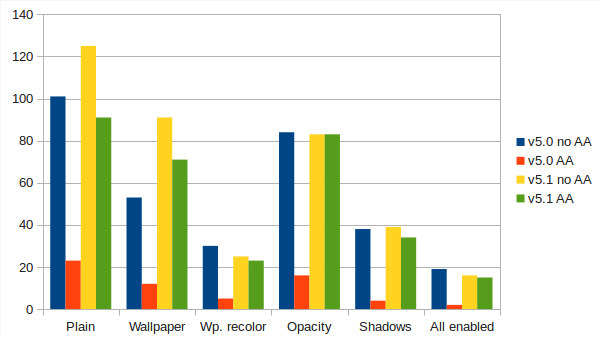
| Setting | v5.0 no AA | v5.0 AA | v5.1 no AA | v5.1 AA |
|---|---|---|---|---|
| Plain | 101 | 23 | 125 | 91 |
| Wallpaper | 53 | 12 | 91 | 71 |
| Wp. recolor | 30 | 5 | 25 | 23 |
| Opacity | 84 | 16 | 83 | 83 |
| Shadows | 38 | 4 | 39 | 34 |
| All enabled | 19 | 2 | 16 | 15 |
Sparse Font Support and New Font Anti-Aliasing System#
To generate fonts for v5.1 you can use a brand new online TTF font converter tool. Available here: https://littlevgl.com/ttf-font-to-c-array
With this tool you can specify a range of characters to convert and optionally you can list the characters to include in the font. It is very useful for Asian fonts where only a few characters are used from a big Unicode range.
The former LV_FONT_ANTIALIAS option is removed from lv_conf.h. Instead you can specify a bpp (bit-per-pixel) value for each font (1, 2, 4 or 8 bpp are supported). It results in better customization to save memory (high bpp for small fonts, low bpp for larger fonts) and in general gives better results with the same font memory footprint. You can enable the built-in fonts with 1, 2, 4 or 8 values to specify their bpp.
Updates on Image Handling#
The old chroma keying (LV_COLOR_TRANSP pixels are transparent) is still available but there is a new feature too: you can assign an Alpha byte to every pixel to realize pixel level opacity. The images with pixel level opacity can have really smooth edges compared to Chroma keying.
To convert images for LittlevGL another online tool is created: https://littlevgl.com/image-to-c-array
In v5.0 you needed to create a file from image data in the RAMFS and then use the file's path in lv_img_set_file(). Now - in v5.1 - a more general and resource friendly way is introduced. You can use the lv_img_set_src() function to set a new source for an image object. There are 3 image sources:
- C array compiled in the code. E.g.
lv_img_set_src(img1, &wallpaper_img). In the example wallpaper_img is generated by the online converter. - Externally stored binary file. E.g.
lv_img_set_src(img1, "S:/path/to/image.bin"). image.bin is also created with the online tool and stored for example on an SD card. - Symbols (as text): E.g.
lv_img_set_src(img1, SYMBOL_CLOSE).
To learn more check the tutorial about the images: https://github.com/littlevgl/lv_examples/tree/master/lv_tutorial/6_images
Code Size Reduction#
The v5.1 can be compiled in less than 50 KB with 10 KB RAM usage. In such a configuration you can use a few object types (a new object type needs ~3 KB ROM) and buffer drawing (LV_VDB_SIZE 2048). It makes LittlevGL capable to run on simple cheap devices with only 64 KB ROM like STM32F103C8.
Migrating from v5.0 to v5.1#
Although it's a minor release you need to do a few things when updating to v5.1:
- Refresh your lv_conf.h from lv_conf_templ.h
- Regenerate your images and fonts using the online converters
All New Features#
lv_refr_set_roundig_cb(): set a function to modify the invalidated area for special display controllerslv_group_set_focus_cb(): set function to call when a new object is focused #94lv_obj_get_type()return string, e.g. "lv_slider", "lv_btn" etc #91- Font handling extension for effective Chinese font handling (custom read functions)
- Remove LV_FONT_ANTIALIAS and add fonts with BPP (bit-per-pixel): 1, 2, 4 and 8
lv_img: add pixel level opacity option (ARGB8888 or ARGB8565)- LV_ANTIALIAS rework: meaning anti-alias lines and curves
- Merge symbol fonts (basic, file and feedback) into one font
lv_group: different default style_mod function with LV_COLOR_DEPTH 1lv_img_set_src()to handle file path, symbols and const variables with one function- LV_PROTECT_PRESS_LOST: prevent the input devices to NOT find new object when the object's pressing is lost
lv_label: draw style.body.padding.hor/ver greater body if body_draw is enabled- LV_LAYOUT_PRETTY: in one row align object vertically to middle
- Add user data option to lv_indev_drv_t and pass it with lv_indev_data_t to the read function #115
- LV_GROUP_KEY_ENTER_LONG: sent by the library on long press of LV_GROUP_KEY_ENTER to trigger long press of the object #113
- LV_INDEV_TYPE_BUTTON: for hardware buttons which press a point on a screen
Bugfixes#
lv_chart: Fix the use of point_num more than 256lv_label: anim. time wasn't applied for LV_LABEL_LONG_ROLLlv_txt_utf8_sizefix for 4 byte characterslv_slider: fix knob_in with not zero min valuelv_area_is_on: handled some cases wronglv_indev: buffered indevs (return true in indev_read) was handled as non-buffered- drag: don't invalidate if the object wasn't moved
Summary#
v5.1 brought a lot of changes to fulfill your needs and we will continue to add new features for you! If you have an idea or have question don't hesitate to ask on GitHub. Don't forget to Star the repository to be informed about news and become part of the community!