What is MicroPython?#
MicroPython is Python for microcontrollers. With MicroPython you can write Python 3 code and run it on bare metal architectures with limited resources.
MicroPython Highlights#
- Compact - Fit and run within just 256k of code space and 16k of RAM. No OS is needed, although you can also run it with an OS if you want.
- Compatible - Strives to be as compatible as possible with normal Python (known as CPython).
- Versatile - Supports many architectures (x86, x86-64, ARM, ARM Thumb, Xtensa).
- Interactive - No need for the compile-flash-boot cycle. With the REPL (interactive prompt) you can type commands and execute them immediately, run scripts, and more.
- Popular - Many platforms are supported. User base is growing bigger. Notable forks include MicroPython, CircuitPython, and MicroPython_ESP32_psRAM_LoBo.
- Embedded Oriented - Comes with modules specifically for embedded systems, such as the machine module for accessing low-level hardware (I/O pins, ADC, UART, SPI, I2C, RTC, Timers, etc.).
Why MicroPython + LVGL?#
MicroPython today does not have a good high-level GUI library. LVGL is an excellent high-level GUI library implemented in C with a C API. LVGL is an object-oriented component-based library, which makes it a natural candidate to map into a higher-level language like Python.
Advantages of Using LVGL in MicroPython#
- Develop GUI in Python - Use a very popular high-level language with paradigms like object-oriented programming.
- Fast Iteration Cycles - With C, each iteration consists of Change code → Build → Flash → Run. In MicroPython it's just Change code → Run. You can even run commands interactively using the REPL (the interactive prompt).
MicroPython + LVGL Use Cases#
- Fast GUI prototyping - Quickly experiment with different designs and layouts.
- Shorten development cycles - Change and fine-tune the GUI without compile/flash overhead.
- Abstract GUI modeling - Define reusable composite objects, taking advantage of Python's language features such as inheritance, closures, list comprehension, generators, exception handling, arbitrary precision integers, and more.
- Broader accessibility - Make LVGL accessible to a larger audience. No need to know C in order to create a nice GUI on an embedded system. This aligns well with CircuitPython's vision, which was designed with education in mind to make it easier for new or inexperienced users to get started with embedded development.
So How Does It Look?#
It's very much like the C API, but object-oriented for LVGL components.
Let's dive right into an example!
A Simple Example#
import lvgl as lv
lv.init()
scr = lv.obj()
btn = lv.btn(scr)
btn.align(lv.scr_act(), lv.ALIGN.CENTER, 0, 0)
label = lv.label(btn)
label.set_text("Button")
lv.scr_load(scr)In this example we create a button, align it to center and add a text label on it, "Button". Finally, we load the screen with the button in order to display it.
A More Advanced Example#
In this example I'll assume you already have some basic knowledge of LVGL. If you don't, please have a quick look at the LVGL tutorial.
class SymbolButton(lv.btn):
    def __init__(self, parent, symbol, text):
        super().__init__(parent)
        self.symbol = lv.label(self)
        self.symbol.set_text(symbol)
        self.symbol.set_style(symbolstyle)

        self.label = lv.label(self)
self.label.set_text(text)In this example we create a reusable composite component called SymbolButton. It's a class, so we can create object instances from it. It's composite because it consists of several native LVGL objects:
- A Button -
SymbolButtoninherits fromlv.btn.lv.btnis a native LVGL button component. - A Symbol label - A label with a symbol style (symbol font) as a child of
self(i.e., child of the parent button that SymbolButton inherits from).lv.labelis a native LVGL label component that represents text inside another component. - A Text label - A label with some text as another child of
self.
The SymbolButton constructor (__init__ function) creates the two labels and sets their contents and style.
Here is an example of how to use our SymbolButton:
self.btn1 = SymbolButton(page, lv.SYMBOL.PLAY, "Play")
self.btn1.set_size(140,100)
self.btn1.align(None, lv.ALIGN.IN_TOP_LEFT, 10, 0)

self.btn2 = SymbolButton(page, lv.SYMBOL.PAUSE, "Pause")
self.btn2.set_size(140,100)
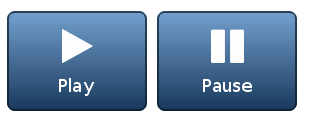
self.btn2.align(self.btn1, lv.ALIGN.OUT_RIGHT_TOP, 10, 0)Here, we set the size of each button, align btn1 to the page and align btn2 relative to btn1. We call set_size and align methods of our composite component SymbolButton - these methods were inherited from SymbolButton's parent, lv.btn, which is an LVGL native object.
The result looks like this:
For a more complete example, which includes other object types as well as action callbacks and driver registration, please have a look at this demo script.
Here are some more examples of how to use LVGL in MicroPython:
Creating a Screen with a Button and Label#
scr = lv.obj()
btn = lv.btn(scr)
btn.align(lv.scr_act(), lv.ALIGN.CENTER, 0, 0)
label = lv.label(btn)
label.set_text("Button")

# Load the screen
lv.scr_load(scr)Creating an Instance of a Struct#
symbolstyle = lv.style_t(lv.style_plain)symbolstyle would be an instance of lv_style_t initialized to the same value of lv_style_plain.
Setting a Field in a Struct#
symbolstyle.text.color = lv.color_hex(0xffffff)symbolstyle.text.color would be initialized to the color struct returned by lv_color_hex.
Setting a Nested Struct Using a Dict#
symbolstyle.text.color = {"red":0xff, "green":0xff, "blue":0xff}Creating an Instance of an Object#
self.tabview = lv.tabview(lv.scr_act())The first argument to an object constructor is the parent object, the second is which element to copy this element from.
Calling an Object Method#
self.symbol.align(self, lv.ALIGN.CENTER, 0, 0)In this example lv.ALIGN is an enum and lv.ALIGN.CENTER is an enum member (an integer value).
Using Callbacks#
for btn, name in [(self.btn1, 'Play'), (self.btn2, 'Pause')]:
btn.set_action(lv.btn.ACTION.CLICK, lambda action,name=name: self.label.set_text('%s click' % name) or lv.RES.OK)Here, we have a loop that sets an action for buttons btn1 and btn2. The action of btn1 is to set label text to "Play click", and the action of btn2 is to set label text to "Pause click".
How does this work? There are two Python features you first need to understand: lambda and closure. set_action function expects two parameters: an action enum (CLICK in this case) and a function. In Python, functions are "first class", meaning they can be treated as values and passed to another function, like in this case.
The function we are passing is a lambda, which is an anonymous function. Its first parameter is the action, and its second parameter is the name variable from the for loop. The function doesn't use the action parameter, but it uses name for setting the label's text.
After setting the label's text, the lambda function finishes and returns lv.RES.OK value. A lambda cannot have a return statement since it must be an expression. set_text is evaluated to None, so set_text(...) or lv.RES.OK is evaluated to lv.RES.OK and is treated as the lambda function's return value.
You might ask yourself - why do we need to pass name as a parameter? Why not use it directly in the lambda like this: lambda action: self.label.set_text('%s click' % name)?
Well, this will not work correctly! Using name like this would create a closure, which is a function object that remembers values in enclosing scopes (name in this case). The problem is that in Python the resolution of name is done when name is executed. If we put name in the lambda function, it's too late - name was already set to Pause so both buttons will set "Pause click" text. We need name to be set when the for loop iteration is executed, not when the lambda function is executed. Therefore we pass name as a parameter, and this is the moment it is resolved. Here is a short Stack Overflow post that explains this.
Currently the binding is limited to only one callback per object.
How Does It Work?#
A script parses LVGL headers and creates a MicroPython module.
To use LVGL in MicroPython, you need MicroPython Binding for LVGL. This binding is a generator for the LVGL MicroPython module. It's essentially a Python script that reads and parses LVGL C headers and generates a MicroPython module from them. This module can be used in MicroPython to access most of the LVGL API.
LVGL is an object-oriented component-based library. There is a base class called lv_obj from which all other components inherit, creating a hierarchy between the components. Objects have their method functions, inherit their parent methods, etc. MicroPython Binding for LVGL takes advantage of this design and models this class hierarchy in Python. You can create your own (pure Python) composite components from existing LVGL components by inheritance.
For more details, please refer to the README of MicroPython Binding for LVGL.
How Can I Use It?#
The quickest way to start: Fork lv_micropython. It has working Unix (Linux) and ESP32 ports of MicroPython + LVGL.
MicroPython Binding for LVGL (lv_binding_micropython) was designed to make it simple to use LVGL with MicroPython. In principle it can support any MicroPython fork.
To add it to some MicroPython fork you need to add lv_binding_micropython under MicroPython lib as a git submodule. lv_binding_micropython itself contains LVGL as a git submodule. In the MicroPython code itself, very few changes are needed. You need to add some lines to the MicroPython Makefile in order to create the LVGL binding module and compile LVGL, and you also need to add the new lvgl module to MicroPython by editing mpconfigport.h.
As an example, I've created lv_micropython - a MicroPython fork with LVGL binding. You can use it as is, or as an example of how to integrate LVGL with MicroPython. lv_micropython can currently be used with LVGL on the unix port and on the ESP32 port.
Available Drivers#
LVGL needs drivers for the display and for the input device. The MicroPython binding contains some example drivers that are registered and used on lv_micropython:
- SDL unix drivers (display and mouse)
- ILI9341 driver for ESP32
- Raw Resistive Touch for ESP32 (ADC connected to screen directly, no touch IC)
It is easy to create new drivers for other displays and input devices. If you add a new driver, we would be happy to add it to MicroPython Binding, so please send us a pull request!
FAQ#
How can I know which LVGL objects and functions are available in MicroPython?#
Almost all of them are available! If some are missing and you need them, please open an issue on the MicroPython Binding Issues section, and we'll try to add them.
- Run MicroPython with LVGL module enabled (for example,
lv_micropython) - Open the REPL (interactive console)
import lvgl as lv- Type
lv.+ TAB for completion. All supported classes and functions of LVGL will be displayed. - Another option:
help(lv) - Another option:
print('\n'.join(dir(lv))) - You can also do that recursively. For example
lv.btn.+ TAB, orprint('\n'.join(dir(lv.btn)))
You can also have a look at the LVGL binding module itself. It is generated during MicroPython build, and is usually called lv_mpy.c.
That's a huge API! There are more than 25K lines of code on the LVGL binding module only! Before counting LVGL code itself!#
It depends on LVGL configuration. It can be small or large. Remember that the LVGL binding module is generated when you build MicroPython, based on LVGL headers and configuration file - lv_conf.h. If you enabled everything in lv_conf.h - the module will be large. You can disable features and remove unneeded components by changing definitions in lv_conf.h, and the module will become much smaller.
Anyway, remember that the module is in Program Memory. It does not consume RAM by itself, only ROM. From a RAM perspective, every instance of an LVGL object will usually consume only a few bytes extra, to represent a MicroPython wrapper object around the LVGL object.
I would like to try it out! What is the quickest way to start?#
The quickest way to start: Fork lv_micropython. It has working unix (Linux) and ESP32 ports of MicroPython + LVGL.
LVGL on Python? Isn't it kinda... slow?#
No. All LVGL functionality (such as rendering the graphics) is still in C. The MicroPython binding only provides wrappers for the LVGL API, such as creating components, setting their properties, layout, styles, etc. Very few cycles are spent there compared to other LVGL functionality.
Can I use LVGL binding on XXXX MicroPython fork?#
Probably yes! You would need to add MicroPython Binding for LVGL as a submodule in your fork, and make some small changes to the Makefile and mpconfigport.h in your port, but that's about it. For more details please have a look at the README.
Can I use LVGL binding with XXXX display/input-device hardware?#
Yes, but you need a driver. LVGL requires a driver for display and input device. Once you have a C driver for your hardware, it's very simple to wrap it as a module in MicroPython and use it with LVGL Binding for MicroPython. You can see some examples of such drivers (and their wrapper MicroPython module) in the driver directory of LVGL Binding for MicroPython.
I need to allocate an LVGL struct (such as Style, Color, etc.). How can I do that? How do I allocate/deallocate memory for it?#
In most cases you don't need to worry about memory allocation. That's because LVGL can take advantage of MicroPython's gc (Garbage Collection). When memory is allocated, MicroPython will know when to release it when it is no longer needed.
LVGL structs are implemented as MicroPython classes under the lvgl module. You can create them as any other object:
import lvgl as lv
s = lv.style_t()You can also create a struct which is a copy of another struct:
import lvgl as lv
s = lv.style_t(lv.style_plain)You can access them much like C structs, using Python attributes:
s.text.color = lv.color_hex(0xffffff)Something is wrong / not working / missing in LVGL on MicroPython!#
Please report bugs and problems on the MicroPython Binding Issues section of MicroPython Binding for LVGL on GitHub. You can also contact us on the LVGL Forum for questions or any other discussions.