Release 6.1 of LVGL contains exciting new features, one of them is Bidirectional support.
More information about this is available on the docs.
Most of the languages use Left-to-Right (LTR for short) writing direction, however some languages (such as Hebrew) use Right-to-Left (RTL for short) direction. LVGL not only supports RTL texts but supports mixed (a.k.a. bidirectional, BiDi) text rendering too.
Supporting mixed bidirectional scripts on LVGL required following the convoluted Unicode Bidirectional Algorithm specifications and creating a custom implementation for resource constrained devices.
While I participated in this effort, most of the work was actually done by Gabor Kiss-Vamosi, which is very impressive since he cannot read any RTL script!
RTL scripts are used by more than 400 million people around the world. The most used script is Arabic script. My personal interest is displaying Hebrew on embedded devices, so this is what I'm going to talk about, but Bidirectional support is beneficial for Arabic scripts as well.
Displaying Hebrew on Embedded Devices#
The steps for displaying Hebrew on LVGL are simple and straightforward:
1. Generate a Font#
LVGL uses its own font format. You can use LVGL font converter to convert a standard ttf font to LVGL font. There is also an online font converter, but I chose to use the command line tool.
The font converter installation and usage instructions are well documented, and this is the command line I used:
node lv_font_conv.js --font FrankRuehlCLM-Medium.ttf -r 0x20-0x7F -r 0x5d0-0x5ea --size 16 --format lvgl --bpp 4 --no-compress -o lv_font_heb_16.cAs input I provided a font from the Culmus project, but you could use any other ttf font. Unicode ranges 0x20-0x7F and 0x5d0-0x5ea cover only the most basic Latin and Hebrew characters.
This command generates a new C file lv_font_heb_16.c, which represents the character glyphs and can be used with LVGL.
2. Build the Font#
The font C file needs to be linked statically with the rest of your project, because unfortunately, it's not possible to load a font file at runtime yet. This is being considered, however.
So either put it under lvgl/src/lv_font/ or specify its location on your Makefile, depending on how you build LVGL.
Then edit lv_conf.h, to associate it with LVGL:
#define LV_FONT_CUSTOM_DECLARE  LV_FONT_DECLARE(lv_font_heb_16)
#define LV_FONT_DEFAULT &lv_font_heb_16Actually, you don't have to set LV_FONT_DEFAULT. But if you don't, you'd have to explicitly set the Hebrew font on every style of every object you want to display (at least on LVGL v6).
3. Enable Bidi#
Bidirectional support is not enabled by default. To enable it, edit lv_conf.h:
#define LV_USE_BIDI 14. Display Hebrew!#
LVGL supports UTF-8 so you can just set UTF-8 text for any label or text box.
Setting the Base Direction#
When displaying RTL text, there is significance to the base directionality of the object that contains the text.
The base dir affects the alignment of the text inside a label, the way intermixed RTL and LTR texts are displayed together and even the way the object itself is displayed and aligned.
For example, a table with LTR base dir would have its first column as the leftmost column, while an RTL table first column would be the rightmost column.
If an entire page or screen is supposed to be RTL, it's enough to either set LV_BIDI_BASE_DIR_DEF on lv_conf.h, or alternatively set the screen (or page) base dir on runtime.
How Does It Look Like?#
A super simple example in C:
/*Create a style which uses a font with Hebrew characters too*/
LV_FONT_DECLARE(lv_font_heb_16);
static lv_style_t style;
lv_style_copy(&style, &lv_style_plain);
style.text.font = &lv_font_heb_16;

/*Create a label and set its text*/
lv_obj_t * label = lv_label_create(lv_scr_act(), NULL);
lv_label_set_style(label, LV_LABEL_STYLE_MAIN, &style);
lv_label_set_text(label, "שלום LittlevGL");
lv_obj_align(label, NULL, LV_ALIGN_CENTER, 0, 0);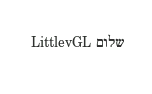
Following are a few more examples in MicroPython, but the same thing can also be achieved with C.
Instead of changing the base dir in lv_conf.h, I'm setting it for my screen. The base dir for all other objects created on that screen will also be set to RTL.
scr = lv.obj()
scr.set_base_dir(lv.BIDI_DIR.RTL)Create 3 tabs:
tabview = lv.tabview(scr)
tab1 = tabview.add_tab("1. אחד")
tab2 = tabview.add_tab("2. שתיים")
tab3 = tabview.add_tab("3. שלוש")Create a table:
style_cell1 = lv.style_t()
lv.style_copy(style_cell1, lv.style_plain)
style_cell1.body.border.width = 1
style_cell1.body.border.color = lv.color_hex3(0xFFF)

style_cell2 = lv.style_t()
lv.style_copy(style_cell2, lv.style_plain)
style_cell2.body.border.width = 1
style_cell2.body.border.color = lv.color_hex3(0xFFF)
style_cell2.body.main_color = lv.color_hex3(0xAAA)
style_cell2.body.grad_color = lv.color_hex3(0xAAA)

table = lv.table(tab1)
table.set_style(table.STYLE.CELL1, style_cell1);
table.set_style(table.STYLE.CELL2, style_cell2);
table.set_style(table.STYLE.BG, lv.style_transp_tight);
table.set_col_cnt(2);
table.set_row_cnt(4);

table.set_cell_align(0, 0, lv.label.ALIGN.CENTER);
table.set_cell_align(0, 1, lv.label.ALIGN.CENTER);

table.set_cell_type(0, 0, 2);
table.set_cell_type(0, 1, 2);

table.set_cell_value(0, 0, "שם");
table.set_cell_value(1, 0, "תפוח");
table.set_cell_value(2, 0, "בנננה");
table.set_cell_value(3, 0, "לימון");

table.set_cell_value(0, 1, "מחיר");
table.set_cell_value(1, 1, "$7");
table.set_cell_value(2, 1, "$4");
table.set_cell_value(3, 1, "$6");And this is how it looks like:
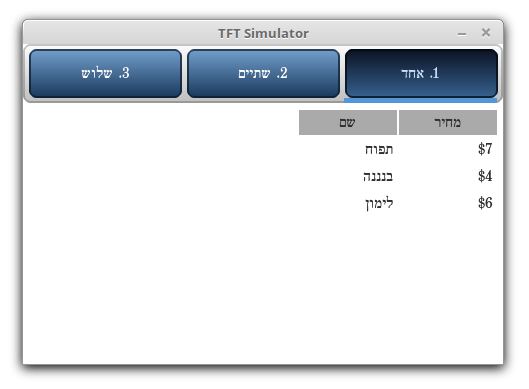
You can see how both the tabs and table columns are ordered from right to left, since they inherited RTL directionality from scr.
Here is another example of intermixed RTL and LTR text:
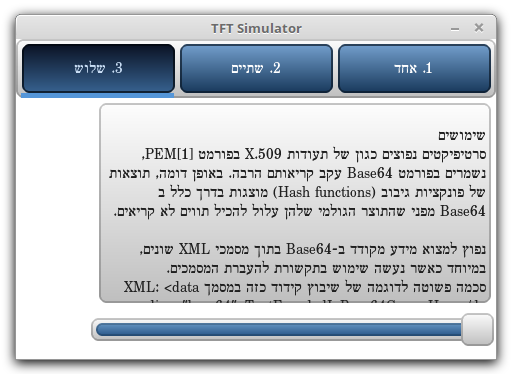
You can see this example, run it and even change it using LVGL online simulator on this link.
What About Arabic?#
Arabic script is an RTL script as well, but we found out it was more complex to render than Hebrew. For LVGL to support Arabic, it would need a few extra features that are still missing today:
- Ligatures
- Diacritics
- Context-sensitive text shaping (each character can have multiple shapes)
If you are willing to help out implementing these missing features in LVGL, please contact us on the forum!