

Targets
Learn how to use `<target>`s to preview your UI on different screen sizes with different assets.
This feature requires LVGL Pro Editor v2.0 or higher.
If multiple <target>s are declared in project.xml, the Editor will allow you to conditionally
include/exclude assets, styles, and even views based on the selected target.
Example configuration
We will use the following project.xml as an example:
<project name="my_ui" lvgl_version="9.5.0">
    <targets>
        <target name="large">
            <display width="800" height="480"/>
            <memory name="int_flash" size="1MB"/>
            <memory name="ospi" size="16MB" bandwidth="4MB/s"/>
        </target>
        <target name="small">
            <display width="480" height="320"/>
            <memory name="int_flash" size="512kB"/>
        </target>
    </targets>
</project>
if_target
Several XML elements support an if_target property where one or more targets can be added to
enable the content of that block.
For example:
<globals>
    <!-- Images for the `large` target -->
    <images if_target="large">
        <data name="logo.png" src_path="images/logo_large.png" />
        <data name="sunny.png" src_path="images/sunny_large.png" />
    </images>

    <!-- Images for all the other cases -->
    <images>
        <data name="logo.png" src_path="images/logo_normal.png" />
        <data name="sunny.png" src_path="images/sunny_normal.png" />
    </images>
</globals>
The same works for
<fonts><styles><consts>- and most importantly
<view>
Multiple targets can be specified as if_target="large|medium".
The block will be included if the current target is either large or medium.
Memory Usage
When a target is set for an <images> or <fonts> block a memory attribute can be added to specify the memory
region to be used from the given target.
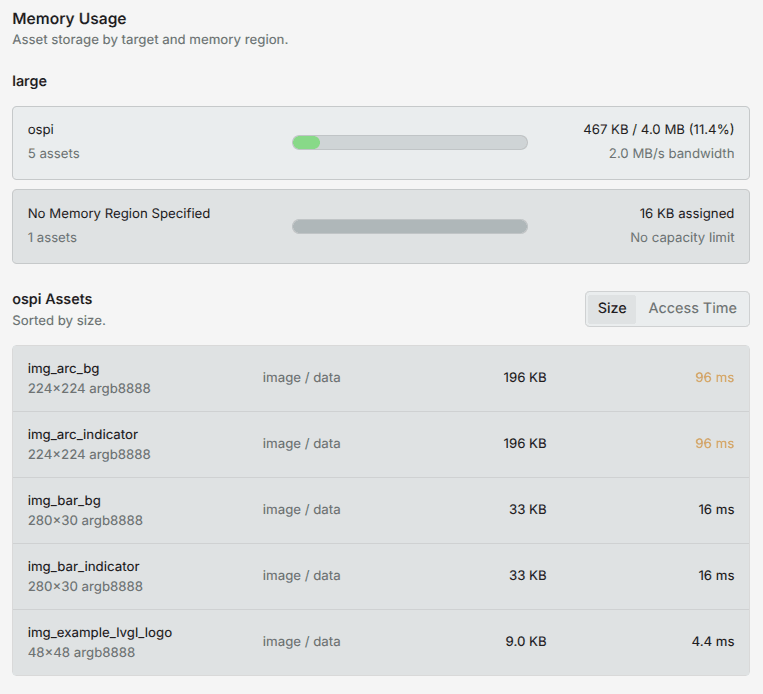
If the memory region is set and globals.xml is opened, the editor will show an overview of the memory usage
for the selected target. It also shows the access time estimation based on the set bandwidth for the given memory region.
Precedence
Always the first match has priority, so if a <view> has an if_target
that matches the current target, all the other <view>s will be ignored.
This allows you to have a default <view> as the last block, and then override it for specific targets before that.
Selecting a target
When C code is exported all the blocks with if_target are wrapped to if and #if. That
is, it's possible to select the target at runtime or at compile time.
Runtime selection
It's useful when you need to support multiple targets with the same binary. For example, if you have a product that comes in two different screen sizes, you can use the same firmware for both, and select the target at runtime based on the detected hardware.
Its disadvantage is that all the assets and styles for all targets will be included in the binary, which increases the size of the firmware.
Also, the firmware needs to support all the features of all targets, which can be a problem if the targets have very different capabilities. For example if a widget uses OpenGL and 3D, it can't run on an MCU. In this case compile time selection is the only option.
To select the target at runtime, you can call <project_name>_set_target(<PROJECT_NAME>_<TARGET_NAME>). For example:
my_ui_set_target(MY_UI_LARGE);Compile time selection
To save memory and binary size, you can select the target at compile time. This way only the assets and styles for the selected target will be included in the binary.
Just set a <PROJECT_NAME>_TARGET define to <PROJECT_NAME>_<TARGET_NAME>. For example:
#define MY_UI_TARGET MY_UI_LARGEIn CMake you can add a definition like this:
add_definitions(-DMY_UI_TARGET=MY_UI_LARGE)Last updated on