

Overview
Master XML syntax rules, naming conventions, and property types used in LVGL Pro Editor for defining UI components.
LVGL Pro Editor uses standard XML syntax with special conventions for property names, values, and type definitions that follow LVGL API patterns.
Naming Conventions
- Attribute names use lowercase letters with
_separation (e.g.,bg_color,font_size) - Tag names must start with a letter or
_and can contain letters,_, and digits - Compound names use
-as separator (e.g.,lv_chart-series) - Color values support multiple formats like CSS:
- Hex with prefix:
0x112233or#112233 - Hex without prefix:
112233 - Short hex:
0x123,#123, or123(all equivalent to#112233)
- Hex with prefix:
- LVGL API alignment: Follow LVGL naming conventions (e.g.,
align="center",bg_color="0xff0000") - Property references: Use
$prefix (e.g.,$param_name) - Constant references: Use
#prefix (e.g.,#const_name) - Expressions: Use
{ }. When referencing properties or constants inside, no$or#is needed
Property Names
Most XML properties use standard syntax without special formatting:
<some_tag prop="value" other_prop="other value"/>Style selectors can be added to property names for advanced styling:
<lv_checkbox style_bg_color-indicator-checked-disabled="0xff0000"/>Types
All types can be used as API property types. Some types are also supported for constants and observer subjects.
Simple Types
| Type | Description | Example |
|---|---|---|
| bool | Boolean value | true or false |
| int | Integer (-2B to 2B, equivalent to int32_t) | 42, -100 |
| px | Pixel units (unit can be omitted) | 10, 10px |
| % | Percentage (must include % unit) | 50%, 100% |
| content | Auto-sizing constant (LV_SIZE_CONTENT) | content |
| string | Null-terminated string | "hello", "'a' 'b'" (multiple) |
| color | 24-bit RGB color value | 0xff0000, #ff0000 |
| opa | Opacity (0-255 or 0-100%) | 128, 50% |
| lv_obj | Widget object pointer | Reference to widget |
| screen | Screen object pointer | Reference to screen |
| time_ms | Time in milliseconds | 500, 1000 |
| deg_0.1 | Degrees with 0.1 resolution | 45.5, 180 |
| scale_1/256 | Scale/Zoom (256=100%, 128=50%) | 256, 512 |
| style_prop | Style property name | bg_opa, text_color |
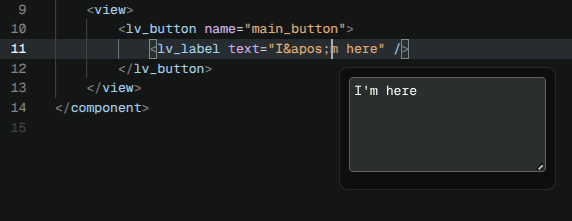
LVGL's XML parser follows the HTML standard where there are reserved characters in property values. For example
", ', <, >, and new line.
So this is invalid: value="I'm here" — ' needs to be escaped as "I'm here".
The Editor show a little popup when you click on a string property, where you can write text in the normal way, and the editor will handle the escaping.
Name-Based Types
In XML files, fonts, images, styles, and other assets are referenced by name, not by pointer:
<style name="red" bg_color="0xff0000"/>The same names can also be used as <prop> types so a Component can accept an asset as a parameter. The values are resolved against items registered in globals.xml:
| Type | Looks up | Example |
|---|---|---|
| image | An image registered under <images> | <prop name="src" type="image" default="img_power"/> |
| font | A font registered under <fonts> | <prop name="title_font" type="font" default="montserrat_22"/> |
| subject | A subject registered under <subjects> | <prop name="subject" type="subject" default="subject_dimmer1"/> |
| style | A style defined in <styles> or globals.xml | <prop name="extra_style" type="style"/> |
These props are typically forwarded into a child element with the $ prefix, e.g. <lv_image src="$src"/> or <lv_slider bind_value="$subject"/>.
Automatic binding occurs for:
- Styles, fonts, images, animations
- Gradients and other visual components
- Components and globals registered in
globals.xml
Manual binding is required for:
- Event callbacks (only available in code)
- Custom fonts or images stored in memory
To register name-data pairs, see the Editor Integration guide.
Arrays
Arrays can be defined in three ways:
| Syntax | Description |
|---|---|
int[5] | Array with a fixed set of elements. |
string[NULL] | Array terminated with a NULL element. NULL can be any other string too, for example grid_dsc[LV_GRID_TEMPLATE_LAST]. |
int[count] | The number of elements is passed to the C API as a separate parameter. Used by lv_chart's values, lv_animimg's src, and lv_line's points. |
string[] | No termination or count parameter |
The termination of the array is important only to
- Validate the correctness of the XML files
- Generate correct code
The items in the array are separated by spaces and the termination is not included. For example
If there is an <api> property like <prop name="values" type="int[3]"/> it can be used as <my_widget values="10 33 55"/>
String items need to be wrapped in ' because an item can be composed of multiple words, so a space alone can't be used as a separator. For example <prop name="list" type="string[NULL]"/> it can be used as: <my_widget values="'This is the first' 'The second' '3rd'"/>
Enums
Custom enums for Widgets can be created using enumdef (not supported for Components):
<api>
  <enumdef name="my_widget_mode" help="Possible modes">
    <enum name="normal" value="0x10" help="Normal mode"/>
    <enum name="inverted" help="Inverted mode"/>
  </enumdef>

  <prop name="mode" type="enum:my_widget_mode" help="Select mode"/>
</api>
Multiple enum values with + suffix allow OR'ing values:
type="axis+"  <!-- Allows selecting multiple axis values -->
axis="primary_x|secondary_y"  <!-- Separate with | -->
Compound Types
Types can be combined to allow multiple options. For example:
type="px|%|content" <!-- Accepts pixels, percentage, or auto-size -->Limiting Accepted Values
This feature is planned but not yet supported. The examples below show the intended syntax.
You can restrict possible values for enums, colors, and strings:
<!-- Enum with limited options -->
type="dir(top bottom)"

<!-- Color with color palette -->
type="color(0xff0000 0x00ff00 0x0000ff)"

<!-- String with fixed options -->
type="string('Ok' 'Cancel')"
Last updated on
Introduction
Learn how LVGL's XML format enables declarative UI development with version control, reusability, and runtime flexibility for embedded applications.
Project File
Configure your LVGL Pro project with project.xml — set the LVGL version, exported code name, and the display targets used to preview screens.