

RA Family
Build, flash, and debug the ready-to-use LVGL projects of the Renesas RA boards with e² studio, the Flexible Software Package (FSP), and J-Link.
Supported boards in the RA Family:
- EK-RA8D1
- EK-RA8P1
- EK-RA6M3G
- EK-RA8D2
Run the Project
Install e² studio: The official IDE of Renesas is called e² studio. Because it's Eclipse-based, it runs on Windows, Linux, and Mac as well.
Members of the RA family require certain versions of the Flexible Software Package (FSP). See the
individual README.md files in the applicable repositories for info. FSPs can be downloaded
here.
Note that from FSP version 6.0 and above LVGL is part of the middleware section of the components. Therefore, when cloning the latest versions of the supported LVGL board repositories, recursive updating of the git submodules is no longer needed.
Install J-Link: J-Link is used for debugging, it can be downloaded here.
Clone the project: Clone the ready-to-use repository of your selected board.
For FSP versions prior to 6.0 the submodules are needed as well:
git clone https://github.com/lvgl/lv_port_renesas_ek-ra8d1_gcc.git --recurse-submodulesDownloading the .zip from GitHub doesn't work as it doesn't download the submodules.
For FSP version 6.0 and above a simple clone is enough:
git clone https://github.com/lvgl/lv_port_renesas_ek-ra8d1_gcc.gitImport the project: Open e² studio, go to File -> Import project and select
General / Existing projects into workspace. Select the cloned folder and press Finish.
Generate the project content: Double-click on configuration.xml. This will activate the
Configuration Window.
Renesas' Flexible Software Package (FSP) includes BSP and HAL layer support extended
with multiple RTOS variants and other middleware stacks. The components will be
available via code generation, including the entry point in main.c.
Press Generate Project Content in the top right corner.
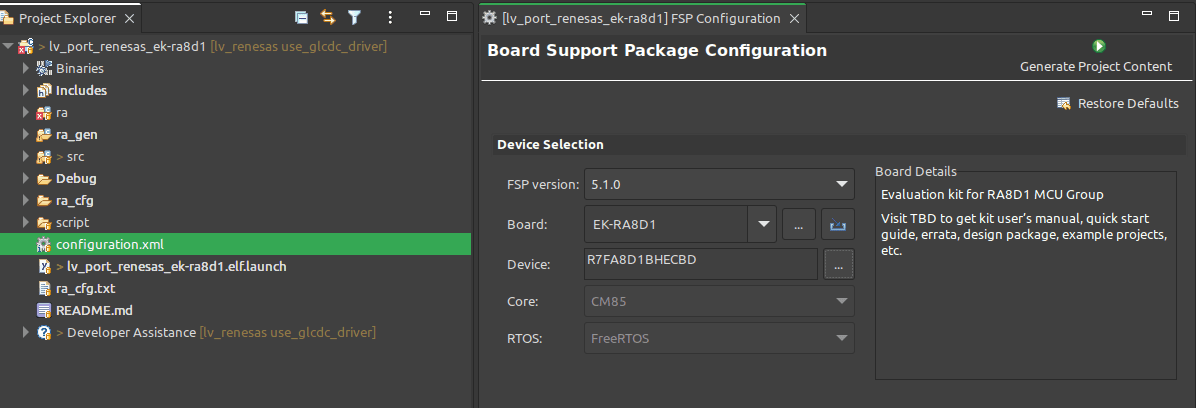
Build the project: Press Ctrl + Alt + B.
Start debugging: Click the Debug button.
If prompted with Debug Configurations, on the Debugger tab select J-Link ARM as
Debug hardware and the proper IC as Target Device:
R7FA8D1BHfor EK-RA8D1R7FA6M3AHfor EK-RA6M3G


On EK-RA8D1 boards, the SW1 DIP switch 7 (in the middle of the board) should be
ON, all others are OFF.
Also note that opening a project previously built on top of an FSP prior to v6.0 will trigger a dialog asking whether you want to migrate to the new FSP v6.0. The migration will not break the project.
Modify the Project
Open a demo
The entry point of the main task is contained in src/LVGL_thread_entry.c.
You can disable the LVGL demos (or just comment them out) and call some
lv_example_...() functions, or add your own custom code.
Configuration
src/lv_conf.h (or src/lv_conf_user.h) contains the most important settings for LVGL. Namely:
LV_COLOR_FORMAT_DEFAULTto set the color format LVGL renders inLV_MEM_SIZEto set the maximum RAM available to LVGLLV_USE_DRAW_DAVE2Dto enable the Dave2D GPU
Hardware and software components can be modified in a visual way using the
Configuration Window.
As of e² studio 2025-04.1 and FSP 6.0.0, LVGL is a managed component.
Common Issues
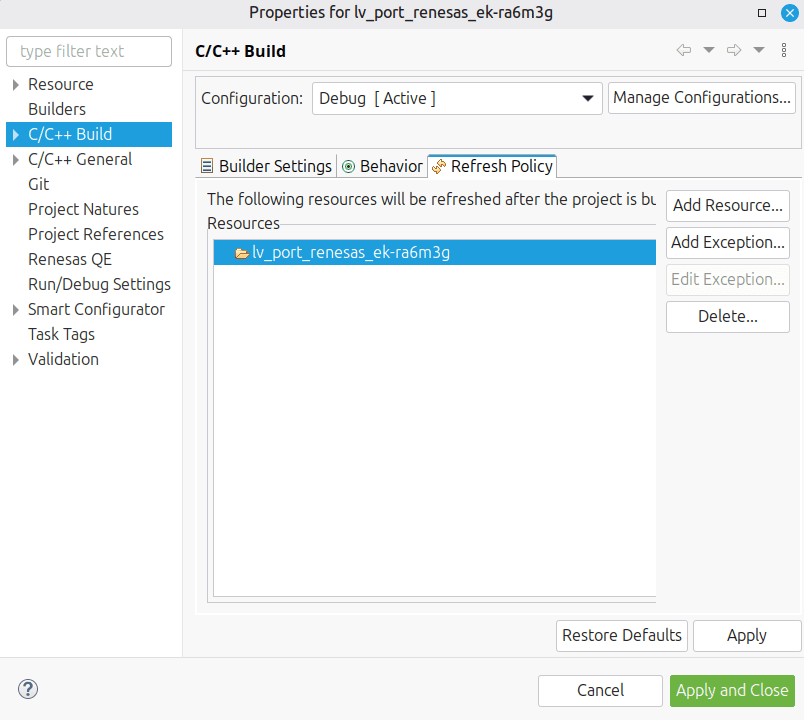
Missing Smart bundle
When you start debugging you might get an error saying that a Smart bundle was not found.
To fix it, in the project properties go to C/C++ Build / Refresh Policy. You should see a
different project name there than yours. Just delete it and add your project.
The application crashes immediately
Sometimes when you start debugging, the application jumps to weird addresses even without
reaching the main function.
To solve it, in the Debug perspective right-click on the debug session and click Restart.
The application crashes immediately or when a new screen is created
Probably the FreeRTOS stack size is too small. Open configuration.xml, search for
rtos.awsfreertos.thread.stack and set it to at least 16384. It should be enough for a
typical application, but for a complex one you might need to go higher.
After that, in e² studio double-click configuration.xml and select Generate Project Content.
Support
In case of any problems or questions open an issue in the corresponding repository.
Last updated on
Built-in Drivers
Renesas is an official partner of LVGL. Therefore, LVGL contains built-in support for Dave2D (the GPU of Renesas) and we also maintain ready-to-use Renesas projects.
RX Family
Build, flash, and debug the ready-to-use LVGL project of the RX72N Envision Kit with e² studio, the Smart Configurator, and the RXv3 toolchain.