

LZ4 Decompression
LVGL provides the extremely fast LZ4 decompression method found in the LZ4 repository on GitHub. It can be used to reduce binary image size. The LZ4 compression is a lossless compression method.
The LVGL's built-in binary image decoder supports LZ4-compressed images. The decoder supports both variable and file as image sources. The original binary data is directly decoded to RAM.
Which Library
If LV_USE_LZ4_INTERNAL is enabled in lv_conf.h, LVGL's internal copy of the
LZ4 decompression algorithm is used (./src/libs/lz4/lz4.c).
If LV_USE_LZ4_EXTERNAL is enabled, the LVGL project is assumed to be compiled and
linked with an external LZ4 library that provides the LZ4_decompress_safe
function.
One of them must be enabled to use LZ4 decompression.
Benefits
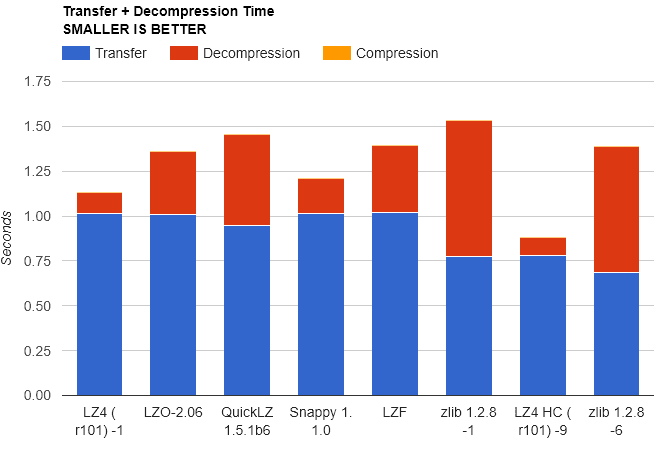
LZ4 is best at compressing data where compression and decompression speed is a priority over compression ratio, making it ideal for applications like real-time data processing.
Usage
To use the LZ4 Decoder, enable it in lv_conf.h configuration file by setting
either LV_USE_LZ4_INTERNAL or LV_USE_LZ4_EXTERNAL to 1. LZ4 images can
then be used in the same way as other images.
lv_image_set_src(img, "path/to/cogwheel.bin");Generating LZ4 Compressed Binary Images
An LZ4 image binary can be directly generated from another image using script
lvgl/scripts/LVGLImage.py.
./scripts/LVGLImage.py --ofmt BIN --cf I8 --compress LZ4 cogwheel.pngThis will decompress cogwheel.png, and then re-compress it using LZ4 and write
the output to ./output/cogwheel.bin.
Last updated on