C
Simple Text area
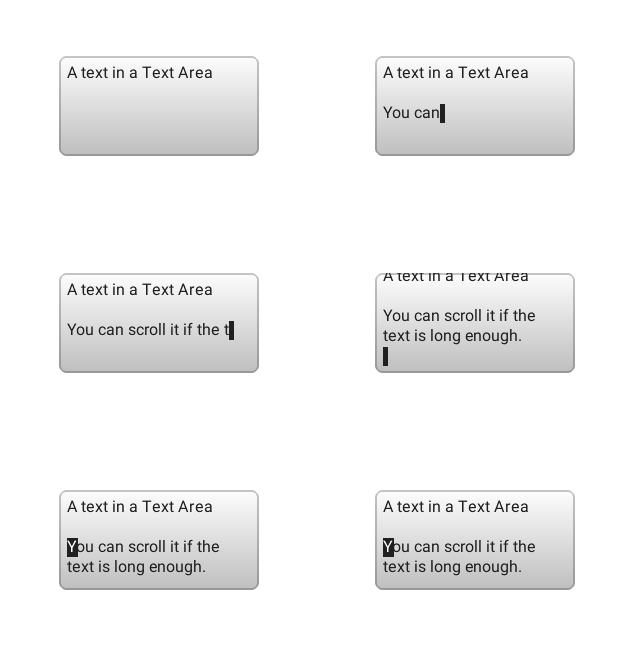
code
#include "lvgl/lvgl.h"
#include <stdio.h>

lv_obj_t * ta1;

static void event_handler(lv_obj_t * obj, lv_event_t event)
{
    if(event == LV_EVENT_VALUE_CHANGED) {
        printf("Value: %s\n", lv_ta_get_text(obj));
    }
    else if(event == LV_EVENT_LONG_PRESSED_REPEAT) {
        /*For simple test: Long press the Text are to add the text below*/
        const char  * txt = "\n\nYou can scroll it if the text is long enough.\n";
        static uint16_t i = 0;
        if(txt[i] != '\0') {
            lv_ta_add_char(ta1, txt[i]);
            i++;
        }
    }
}


void lv_ex_ta_1(void)
{
    ta1 = lv_ta_create(lv_scr_act(), NULL);
    lv_obj_set_size(ta1, 200, 100);
    lv_obj_align(ta1, NULL, LV_ALIGN_CENTER, 0, 0);
    lv_ta_set_cursor_type(ta1, LV_CURSOR_BLOCK);
    lv_ta_set_text(ta1, "A text in a Text Area");    /*Set an initial text*/
    lv_obj_set_event_cb(ta1, event_handler);
}
Text are with password field
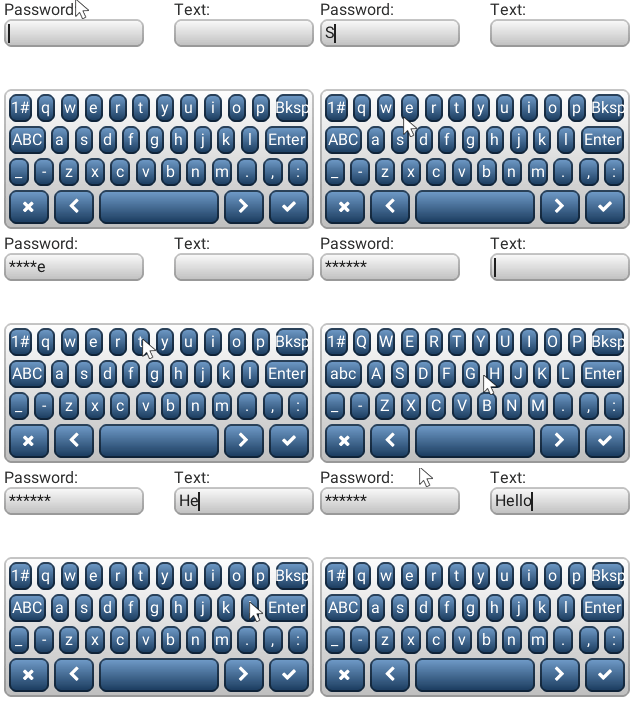
code
/**
 * @file lv_ex_templ.c
 *
 */

/*********************
 *      INCLUDES
 *********************/
#include "lvgl/lvgl.h"
#include <stdio.h>

/*********************
 *      DEFINES
 *********************/

/**********************
 *      TYPEDEFS
 **********************/

/**********************
 *  STATIC PROTOTYPES
 **********************/
static void kb_event_cb(lv_obj_t * event_kb, lv_event_t event);
static void ta_event_cb(lv_obj_t * ta, lv_event_t event);

/**********************
 *  STATIC VARIABLES
 **********************/

static lv_obj_t * kb;
/**********************
 *      MACROS
 **********************/

/**********************
 *   GLOBAL FUNCTIONS
 **********************/

void lv_ex_ta_2(void)
{
    /* Create the password box */
    lv_obj_t * pwd_ta = lv_ta_create(lv_scr_act(), NULL);
    lv_ta_set_text(pwd_ta, "");
    lv_ta_set_pwd_mode(pwd_ta, true);
    lv_ta_set_one_line(pwd_ta, true);
    lv_obj_set_width(pwd_ta, LV_HOR_RES / 2 - 20);
    lv_obj_set_pos(pwd_ta, 5, 20);
    lv_obj_set_event_cb(pwd_ta, ta_event_cb);

    /* Create a label and position it above the text box */
    lv_obj_t * pwd_label = lv_label_create(lv_scr_act(), NULL);
    lv_label_set_text(pwd_label, "Password:");
    lv_obj_align(pwd_label, pwd_ta, LV_ALIGN_OUT_TOP_LEFT, 0, 0);


    /* Create the one-line mode text area */
    lv_obj_t * oneline_ta = lv_ta_create(lv_scr_act(), pwd_ta);
    lv_ta_set_pwd_mode(oneline_ta, false);
    lv_ta_set_cursor_type(oneline_ta, LV_CURSOR_LINE | LV_CURSOR_HIDDEN);
    lv_obj_align(oneline_ta, NULL, LV_ALIGN_IN_TOP_RIGHT, -5, 20);

    /* Create a label and position it above the text box */
    lv_obj_t * oneline_label = lv_label_create(lv_scr_act(), NULL);
    lv_label_set_text(oneline_label, "Text:");
    lv_obj_align(oneline_label, oneline_ta, LV_ALIGN_OUT_TOP_LEFT, 0, 0);

    /* Create a keyboard and make it fill the width of the above text areas */
    kb = lv_kb_create(lv_scr_act(), NULL);
    lv_obj_set_pos(kb, 5, 90);
    lv_obj_set_event_cb(kb, kb_event_cb); /* Setting a custom event handler stops the keyboard from closing automatically */
    lv_obj_set_size(kb,  LV_HOR_RES - 10, 140);

    lv_kb_set_ta(kb, pwd_ta); /* Focus it on one of the text areas to start */
    lv_kb_set_cursor_manage(kb, true); /* Automatically show/hide cursors on text areas */
}

/**********************
 *   STATIC FUNCTIONS
 **********************/

static void kb_event_cb(lv_obj_t * event_kb, lv_event_t event)
{
    /* Just call the regular event handler */
    lv_kb_def_event_cb(event_kb, event);

}
static void ta_event_cb(lv_obj_t * ta, lv_event_t event)
{
    if(event == LV_EVENT_CLICKED) {
        /* Focus on the clicked text area */
        if(kb != NULL)
            lv_kb_set_ta(kb, ta);
    }

    else if(event == LV_EVENT_INSERT) {
        const char * str = lv_event_get_data();
        if(str[0] == '\n') {
            printf("Ready\n");
        }
    }
}
MicroPython
Simple Text area
code
def event_handler(obj, event):
    if event == lv.EVENT.VALUE_CHANGED:
        print("Value: %s" % obj.get_text())
    elif event == lv.EVENT.LONG_PRESSED_REPEAT:
        # For simple test: Long press the Text are to add the text below
        ta1.add_text("\n\nYou can scroll it if the text is long enough.\n")

ta1 = lv.ta(lv.scr_act())
ta1.set_size(200, 100)
ta1.align(None, lv.ALIGN.CENTER, 0, 0)
ta1.set_cursor_type(lv.CURSOR.BLOCK)
ta1.set_text("A text in a Text Area")     # Set an initial text
ta1.set_event_cb(event_handler)
Text are with password field
code
HOR_RES = lv.disp_get_hor_res(lv.disp_get_default())

def kb_event_cb(event_kb, event):
    # Just call the regular event handler
    event_kb.def_event_cb(event)

def ta_event_cb(ta, event):
    if event == lv.EVENT.INSERT:
        # get inserted value
        ptr = lv.C_Pointer()
        ptr.ptr_val = lv.event_get_data()
        if ptr.str_val == "\n":
            print("Ready")
    elif event == lv.EVENT.CLICKED:
        # Focus on the clicked text area
        kb.set_ta(ta)

# Create the password box
pwd_ta = lv.ta(lv.scr_act())
pwd_ta.set_text("");
pwd_ta.set_pwd_mode(True)
pwd_ta.set_one_line(True)
pwd_ta.set_width(HOR_RES // 2 - 20)
pwd_ta.set_pos(5, 20)
pwd_ta.set_event_cb(ta_event_cb)

# Create a label and position it above the text box
pwd_label = lv.label(lv.scr_act())
pwd_label.set_text("Password:")
pwd_label.align(pwd_ta, lv.ALIGN.OUT_TOP_LEFT, 0, 0)

# Create the one-line mode text area
oneline_ta = lv.ta(lv.scr_act(), pwd_ta)
oneline_ta.set_pwd_mode(False)
oneline_ta.set_cursor_type(lv.CURSOR.LINE | lv.CURSOR.HIDDEN)
oneline_ta.align(None, lv.ALIGN.IN_TOP_RIGHT, -5, 20)
oneline_ta.set_event_cb(ta_event_cb)

# Create a label and position it above the text box
oneline_label = lv.label(lv.scr_act())
oneline_label.set_text("Text:")
oneline_label.align(oneline_ta, lv.ALIGN.OUT_TOP_LEFT, 0, 0)

# Create a keyboard and make it fill the width of the above text areas
kb = lv.kb(lv.scr_act())
kb.set_pos(5, 90)
kb.set_event_cb(kb_event_cb) # Setting a custom event handler stops the keyboard from closing automatically
kb.set_size(HOR_RES - 10, 140)

kb.set_ta(pwd_ta) # Focus it on one of the text areas to start
kb.set_cursor_manage(True) # Automatically show/hide cursors on text areas