C
Simple Message box
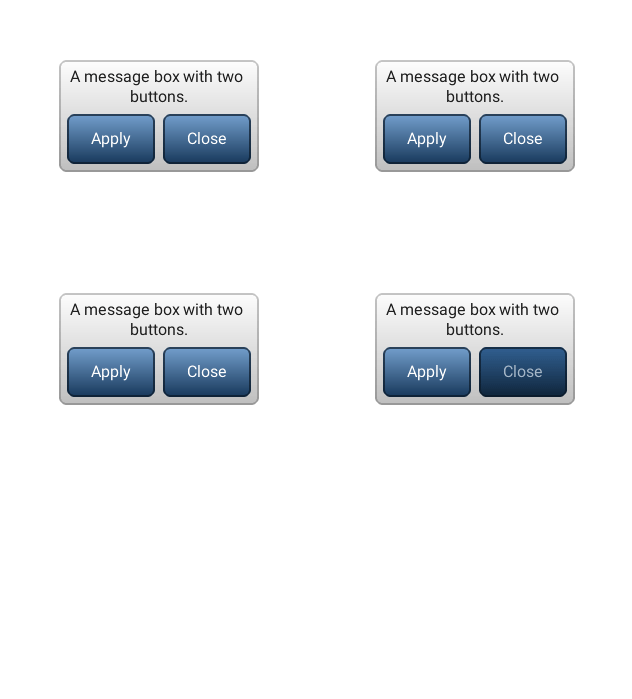
code
#include "lvgl/lvgl.h"
#include <stdio.h>

static void event_handler(lv_obj_t * obj, lv_event_t event)
{
    if(event == LV_EVENT_VALUE_CHANGED) {
        printf("Button: %s\n", lv_mbox_get_active_btn_text(obj));
    }
}

void lv_ex_mbox_1(void)
{
    static const char * btns[] ={"Apply", "Close", ""};

    lv_obj_t * mbox1 = lv_mbox_create(lv_scr_act(), NULL);
    lv_mbox_set_text(mbox1, "A message box with two buttons.");
    lv_mbox_add_btns(mbox1, btns);
    lv_obj_set_width(mbox1, 200);
    lv_obj_set_event_cb(mbox1, event_handler);
    lv_obj_align(mbox1, NULL, LV_ALIGN_CENTER, 0, 0); /*Align to the corner*/
}
Modal
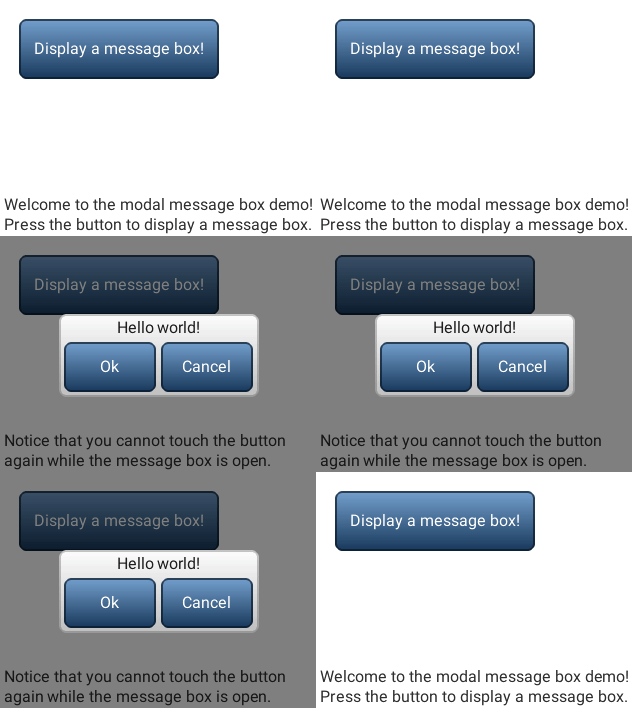
code
/**
 * @file lv_ex_mbox_2.c
 *
 */

/*********************
 *      INCLUDES
 *********************/

#include "lvgl/lvgl.h"


/**********************
 *  STATIC PROTOTYPES
 **********************/

static void mbox_event_cb(lv_obj_t *obj, lv_event_t evt);
static void btn_event_cb(lv_obj_t *btn, lv_event_t evt);

/**********************
 *  STATIC VARIABLES
 **********************/

static lv_obj_t *mbox, *info;

static const char welcome_info[] = "Welcome to the modal message box demo!\n"
                                   "Press the button to display a message box.";

static const char in_msg_info[] = "Notice that you cannot touch "
                                  "the button again while the message box is open.";

/**********************
 *   GLOBAL FUNCTIONS
 **********************/

void lv_ex_mbox_2(void)
{
	/* Create a button, then set its position and event callback */
	lv_obj_t *btn = lv_btn_create(lv_scr_act(), NULL);
	lv_obj_set_size(btn, 200, 60);
	lv_obj_set_event_cb(btn, btn_event_cb);
	lv_obj_align(btn, NULL, LV_ALIGN_IN_TOP_LEFT, 20, 20);

	/* Create a label on the button */
	lv_obj_t *label = lv_label_create(btn, NULL);
	lv_label_set_text(label, "Display a message box!");

	/* Create an informative label on the screen */
	info = lv_label_create(lv_scr_act(), NULL);
	lv_label_set_text(info, welcome_info);
	lv_label_set_long_mode(info, LV_LABEL_LONG_BREAK); /* Make sure text will wrap */
	lv_obj_set_width(info, LV_HOR_RES - 10);
	lv_obj_align(info, NULL, LV_ALIGN_IN_BOTTOM_LEFT, 5, -5);

}

/**********************
 *   STATIC FUNCTIONS
 **********************/

static void mbox_event_cb(lv_obj_t *obj, lv_event_t evt)
{
	if(evt == LV_EVENT_DELETE && obj == mbox) {
		/* Delete the parent modal background */
		lv_obj_del_async(lv_obj_get_parent(mbox));
		mbox = NULL; /* happens before object is actually deleted! */
		lv_label_set_text(info, welcome_info);
	} else if(evt == LV_EVENT_VALUE_CHANGED) {
		/* A button was clicked */
		lv_mbox_start_auto_close(mbox, 0);
	}
}

static void btn_event_cb(lv_obj_t *btn, lv_event_t evt)
{
	if(evt == LV_EVENT_CLICKED) {
		static lv_style_t modal_style;
		/* Create a full-screen background */
		lv_style_copy(&modal_style, &lv_style_plain_color);

		/* Set the background's style */
		modal_style.body.main_color = modal_style.body.grad_color = LV_COLOR_BLACK;
		modal_style.body.opa = LV_OPA_50;

		/* Create a base object for the modal background */
		lv_obj_t *obj = lv_obj_create(lv_scr_act(), NULL);
		lv_obj_set_style(obj, &modal_style);
		lv_obj_set_pos(obj, 0, 0);
		lv_obj_set_size(obj, LV_HOR_RES, LV_VER_RES);
		lv_obj_set_opa_scale_enable(obj, true); /* Enable opacity scaling for the animation */

		static const char * btns2[] = {"Ok", "Cancel", ""};

		/* Create the message box as a child of the modal background */
		mbox = lv_mbox_create(obj, NULL);
		lv_mbox_add_btns(mbox, btns2);
		lv_mbox_set_text(mbox, "Hello world!");
		lv_obj_align(mbox, NULL, LV_ALIGN_CENTER, 0, 0);
		lv_obj_set_event_cb(mbox, mbox_event_cb);

		/* Fade the message box in with an animation */
		lv_anim_t a;
		lv_anim_init(&a);
		lv_anim_set_time(&a, 500, 0);
		lv_anim_set_values(&a, LV_OPA_TRANSP, LV_OPA_COVER);
		lv_anim_set_exec_cb(&a, obj, (lv_anim_exec_xcb_t)lv_obj_set_opa_scale);
		lv_anim_create(&a);

		lv_label_set_text(info, in_msg_info);
	    lv_obj_align(info, NULL, LV_ALIGN_IN_BOTTOM_LEFT, 5, -5);
	}
}
MicroPython
Simple Message box
code
def event_handler(obj, event):
    if event == lv.EVENT.VALUE_CHANGED:
        print("Button: %s" % lv.mbox.get_active_btn_text(obj))

btns = ["Apply", "Close", ""]

mbox1 = lv.mbox(lv.scr_act())
mbox1.set_text("A message box with two buttons.");
mbox1.add_btns(btns)
mbox1.set_width(200)
mbox1.set_event_cb(event_handler)
mbox1.align(None, lv.ALIGN.CENTER, 0, 0)  # Align to the corner
Modal
code
welcome_info = "Welcome to the modal message box demo!\nPress the button to display a message box."
in_msg_info = "Notice that you cannot touch the button again while the message box is open."

class Modal(lv.mbox):
    """mbox with semi-transparent background"""
    def __init__(self, parent, *args, **kwargs):
        # Create a full-screen background
        modal_style = lv.style_t()
        lv.style_copy(modal_style, lv.style_plain_color)
        # Set the background's style
        modal_style.body.main_color = modal_style.body.grad_color = lv.color_make(0,0,0)
        modal_style.body.opa = lv.OPA._50

        # Create a base object for the modal background
        self.bg = lv.obj(parent)
        self.bg.set_style(modal_style)
        self.bg.set_pos(0, 0)
        self.bg.set_size(parent.get_width(), parent.get_height())
        self.bg.set_opa_scale_enable(True)  # Enable opacity scaling for the animation

        super().__init__(self.bg, *args, **kwargs)
        self.align(None, lv.ALIGN.CENTER, 0, 0)

        # Fade the message box in with an animation
        a = lv.anim_t()
        lv.anim_init(a)
        lv.anim_set_time(a, 500, 0)
        lv.anim_set_values(a, lv.OPA.TRANSP, lv.OPA.COVER)
        lv.anim_set_exec_cb(a, self.bg, lv.obj.set_opa_scale)
        lv.anim_create(a)
        super().set_event_cb(self.default_callback)

    def set_event_cb(self, callback):
        self.callback = callback

    def get_event_cb(self):
        return self.callback

    def default_callback(self, obj, evt):
        if evt == lv.EVENT.DELETE:# and obj == self:
            # Delete the parent modal background
            self.get_parent().del_async()
        elif evt == lv.EVENT.VALUE_CHANGED:
            # A button was clicked
            self.start_auto_close(0)
        # Call user-defined callback
        if self.callback is not None:
            self.callback(obj, evt)

def mbox_event_cb(obj, evt):
    if evt == lv.EVENT.DELETE:
        info.set_text(welcome_info)

def btn_event_cb(btn, evt):
    if evt == lv.EVENT.CLICKED:

        btns2 = ["Ok", "Cancel", ""]

        # Create the message box as a child of the modal background
        mbox = Modal(lv.scr_act())
        mbox.add_btns(btns2)
        mbox.set_text("Hello world!")
        mbox.set_event_cb(mbox_event_cb)

        info.set_text(in_msg_info)
        info.align(None, lv.ALIGN.IN_BOTTOM_LEFT, 5, -5)

# Get active screen
scr = lv.scr_act()

# Create a button, then set its position and event callback
btn = lv.btn(scr)
btn.set_size(200, 60)
btn.set_event_cb(btn_event_cb)
btn.align(None, lv.ALIGN.IN_TOP_LEFT, 20, 20)

# Create a label on the button
label = lv.label(btn)
label.set_text("Display a message box!")

# Create an informative label on the screen
info = lv.label(scr)
info.set_text(welcome_info)
info.set_long_mode(lv.label.LONG.BREAK) # Make sure text will wrap
info.set_width(scr.get_width() - 10)
info.align(None, lv.ALIGN.IN_BOTTOM_LEFT, 5, -5)