C
Simple Line
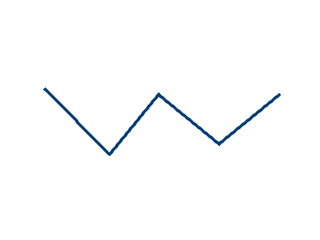
code
#include "lvgl/lvgl.h"

void lv_ex_line_1(void)
{
    /*Create an array for the points of the line*/
    static lv_point_t line_points[] = { {5, 5}, {70, 70}, {120, 10}, {180, 60}, {240, 10} };

    /*Create new style (thick dark blue)*/
    static lv_style_t style_line;
    lv_style_copy(&style_line, &lv_style_plain);
    style_line.line.color = LV_COLOR_MAKE(0x00, 0x3b, 0x75);
    style_line.line.width = 3;
    style_line.line.rounded = 1;

    /*Copy the previous line and apply the new style*/
    lv_obj_t * line1;
    line1 = lv_line_create(lv_scr_act(), NULL);
    lv_line_set_points(line1, line_points, 5);     /*Set the points*/
    lv_line_set_style(line1, LV_LINE_STYLE_MAIN, &style_line);
    lv_obj_align(line1, NULL, LV_ALIGN_CENTER, 0, 0);
}
MicroPython
Simple Line
code
# Create an array for the points of the line
line_points = [ {"x":5, "y":5},
                {"x":70, "y":70},
                {"x":120, "y":10},
                {"x":180, "y":60},
                {"x":240, "y":10}]

# Create new style (thick dark blue)
style_line = lv.style_t()
lv.style_copy(style_line, lv.style_plain)
style_line.line.color = lv.color_make(0x00, 0x3b, 0x75)
style_line.line.width = 3
style_line.line.rounded = 1

# Copy the previous line and apply the new style
line1 = lv.line(lv.scr_act())
line1.set_points(line_points, len(line_points))      # Set the points
line1.set_style(lv.line.STYLE.MAIN, style_line)
line1.align(None, lv.ALIGN.CENTER, 0, 0)