C
Label recoloring and scrolling
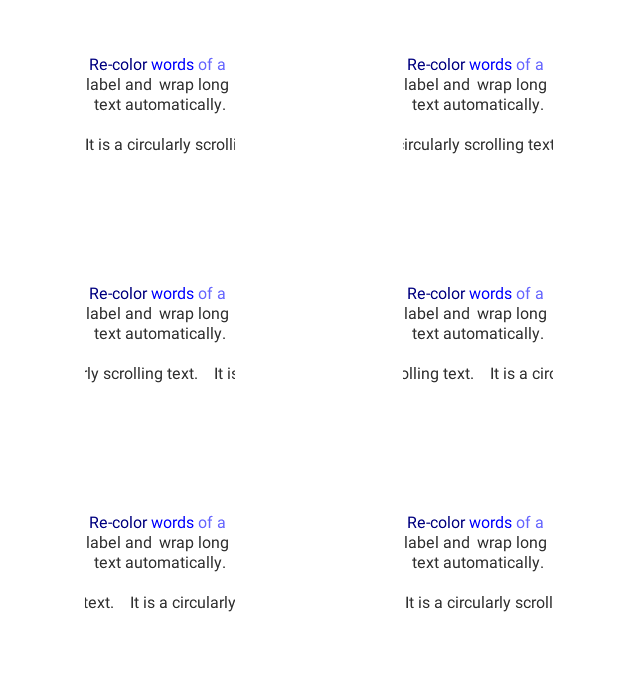
code
#include "lvgl/lvgl.h"

void lv_ex_label_1(void)
{
    lv_obj_t * label1 = lv_label_create(lv_scr_act(), NULL);
    lv_label_set_long_mode(label1, LV_LABEL_LONG_BREAK);     /*Break the long lines*/
    lv_label_set_recolor(label1, true);                      /*Enable re-coloring by commands in the text*/
    lv_label_set_align(label1, LV_LABEL_ALIGN_CENTER);       /*Center aligned lines*/
    lv_label_set_text(label1, "#000080 Re-color# #0000ff words# #6666ff of a# label "
                              "and  wrap long text automatically.");
    lv_obj_set_width(label1, 150);
    lv_obj_align(label1, NULL, LV_ALIGN_CENTER, 0, -30);

    lv_obj_t * label2 = lv_label_create(lv_scr_act(), NULL);
    lv_label_set_long_mode(label2, LV_LABEL_LONG_SROLL_CIRC);     /*Circular scroll*/
    lv_obj_set_width(label2, 150);
    lv_label_set_text(label2, "It is a circularly scrolling text. ");
    lv_obj_align(label2, NULL, LV_ALIGN_CENTER, 0, 30);
}
Text shadow
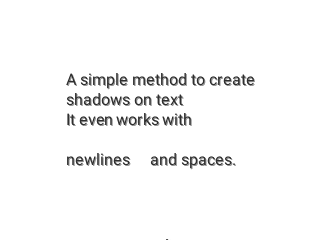
code
#include "lvgl/lvgl.h"

void lv_ex_label_2(void)
{
    /* Create a style for the shadow*/
    static lv_style_t label_style;
    lv_style_copy(&label_style, &lv_style_plain);
    label_style.text.opa = LV_OPA_50;

    /*Create a label for the shadow first (it's in the background) */
    lv_obj_t * shadow_label = lv_label_create(lv_scr_act(), NULL);
    lv_label_set_style(shadow_label, LV_LABEL_STYLE_MAIN, &label_style);

    /* Create the main label */
    lv_obj_t * main_label = lv_label_create(lv_scr_act(), NULL);
    lv_label_set_text(main_label, "A simple method to create\n"
                                  "shadows on text\n"
                                  "It even works with\n\n"
                                  "newlines     and spaces.");

    /*Set the same text for the shadow label*/
    lv_label_set_text(shadow_label, lv_label_get_text(main_label));

    /* Position the main label */
    lv_obj_align(main_label, NULL, LV_ALIGN_CENTER, 0, 0);

    /* Shift the second label down and to the right by 1 pixel */
    lv_obj_align(shadow_label, main_label, LV_ALIGN_IN_TOP_LEFT, 1, 1);
}
Align labels
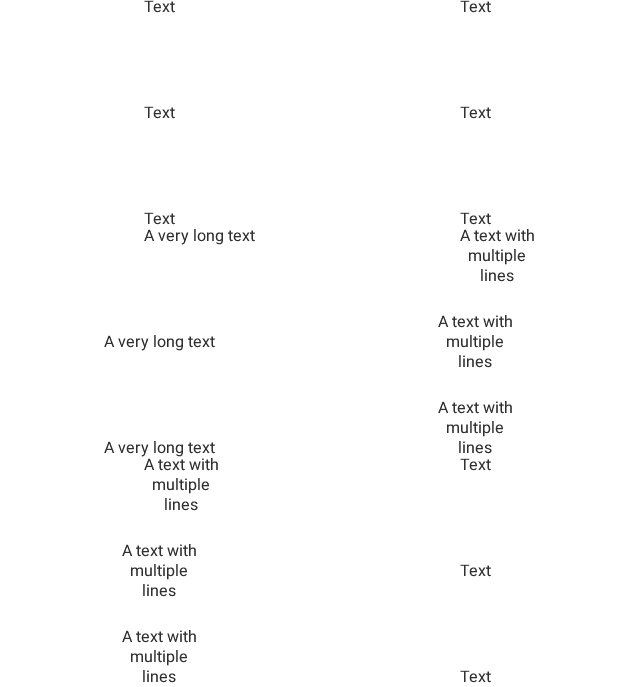
code
#include "lvgl/lvgl.h"

static void text_changer(lv_task_t * t);

lv_obj_t * labels[3];

/**
 * Create three labels to demonstrate the alignments.
 */
void lv_ex_label_3(void)
{
    /*`lv_label_set_align` is not required to align the object itslef.
     * It's used only when the text has multiple lines*/

    /* Create a label on the top.
     * No additional alignment so it will be the reference*/
    labels[0] = lv_label_create(lv_scr_act(), NULL);
    lv_obj_align(labels[0], NULL, LV_ALIGN_IN_TOP_MID, 0, 5);
    lv_label_set_align(labels[0], LV_LABEL_ALIGN_CENTER);

    /* Create a label in the middle.
     * `lv_obj_align` will be called every time the text changes
     * to keep the middle position */
    labels[1] = lv_label_create(lv_scr_act(), NULL);
    lv_obj_align(labels[1], NULL, LV_ALIGN_CENTER, 0, 0);
    lv_label_set_align(labels[1], LV_LABEL_ALIGN_CENTER);

    /* Create a label in the bottom.
     * Enable auto realign. */
    labels[2] = lv_label_create(lv_scr_act(), NULL);
    lv_obj_set_auto_realign(labels[2], true);
    lv_obj_align(labels[2], NULL, LV_ALIGN_IN_BOTTOM_MID, 0, -5);
    lv_label_set_align(labels[2], LV_LABEL_ALIGN_CENTER);

    lv_task_t * t = lv_task_create(text_changer, 1000, LV_TASK_PRIO_MID, NULL);
    lv_task_ready(t);
}

static void text_changer(lv_task_t * t)
{
    const char * texts[] = {"Text", "A very long text", "A text with\nmultiple\nlines", NULL};
    static uint8_t i = 0;

    lv_label_set_text(labels[0], texts[i]);
    lv_label_set_text(labels[1], texts[i]);
    lv_label_set_text(labels[2], texts[i]);

    /*Manually realaign `labels[1]`*/
    lv_obj_align(labels[1], NULL, LV_ALIGN_CENTER, 0, 0);

    i++;
    if(texts[i] == NULL) i = 0;

}
MicroPython
Label recoloring and scrolling
code
label1 = lv.label(lv.scr_act())
label1.set_long_mode(lv.label.LONG.BREAK)     # Break the long lines
label1.set_recolor(True)                      # Enable re-coloring by commands in the text
label1.set_align(lv.label.ALIGN.CENTER)       # Center aligned lines
label1.set_text("#000080 Re-color# #0000ff words# #6666ff of a# label " +
                "and  wrap long text automatically.")
label1.set_width(150)
label1.align(None, lv.ALIGN.CENTER, 0, -30)

label2 = lv.label(lv.scr_act())
label2.set_long_mode(lv.label.LONG.SROLL_CIRC)     # Circular scroll
label2.set_width(150)
label2.set_text("It is a circularly scrolling text. ")
label2.align(None, lv.ALIGN.CENTER, 0, 30)
Text shadow
code
# Create a style for the shadow
label_style = lv.style_t()
lv.style_copy(label_style, lv.style_plain)
label_style.text.opa = lv.OPA._50

# Create a label for the shadow first (it's in the background)
shadow_label = lv.label(lv.scr_act())
shadow_label.set_style(lv.label.STYLE.MAIN, label_style)

# Create the main label
main_label = lv.label(lv.scr_act())
main_label.set_text("A simple method to create\n" +
                              "shadows on text\n" +
                              "It even works with\n\n" +
                              "newlines     and spaces.")

# Set the same text for the shadow label
shadow_label.set_text(main_label.get_text())

# Position the main label
main_label.align(None, lv.ALIGN.CENTER, 0, 0)

# Shift the second label down and to the right by 1 pixel
shadow_label.align(main_label, lv.ALIGN.IN_TOP_LEFT, 1, 1)
Align labels
code
# Create three labels to demonstrate the alignments.
labels = []

# `lv_label_set_align` is not required to align the object itslef.
# It's used only when the text has multiple lines

# Create a label on the top.
# No additional alignment so it will be the reference
label = lv.label(lv.scr_act())
label.align(None, lv.ALIGN.IN_TOP_MID, 0, 5)
label.set_align(lv.label.ALIGN.CENTER)
labels.append(label)

# Create a label in the middle.
# `lv_obj_align` will be called every time the text changes
# to keep the middle position
label = lv.label(lv.scr_act())
label.align(None, lv.ALIGN.CENTER, 0, 0)
label.set_align(lv.label.ALIGN.CENTER)
labels.append(label)

# Create a label in the bottom.
# Enable auto realign.
label = lv.label(lv.scr_act())
label.set_auto_realign(True)
label.align(None, lv.ALIGN.IN_BOTTOM_MID, 0, -5)
label.set_align(lv.label.ALIGN.CENTER)
labels.append(label)

class TextChanger:
    """Changes texts of all labels every second"""
    def __init__(self, labels,
                texts=["Text", "A very long text", "A text with\nmultiple\nlines"],
                rate=1000):
        self.texts = texts
        self.labels = labels
        self.rate = rate
        self.counter = 0

    def start(self):
        lv.task_create(self.task_cb, self.rate, lv.TASK_PRIO.LOWEST, None)

    def task_cb(self, task):
        for label in labels:
            label.set_text(self.texts[self.counter])

        # Manually realaign `labels[1]`
        if len(self.labels) > 1:
            self.labels[1].align(None, lv.ALIGN.CENTER, 0, 0)

        self.counter = (self.counter + 1) % len(self.texts)

text_changer = TextChanger(labels)
text_changer.start()