C
Keyboard with text area
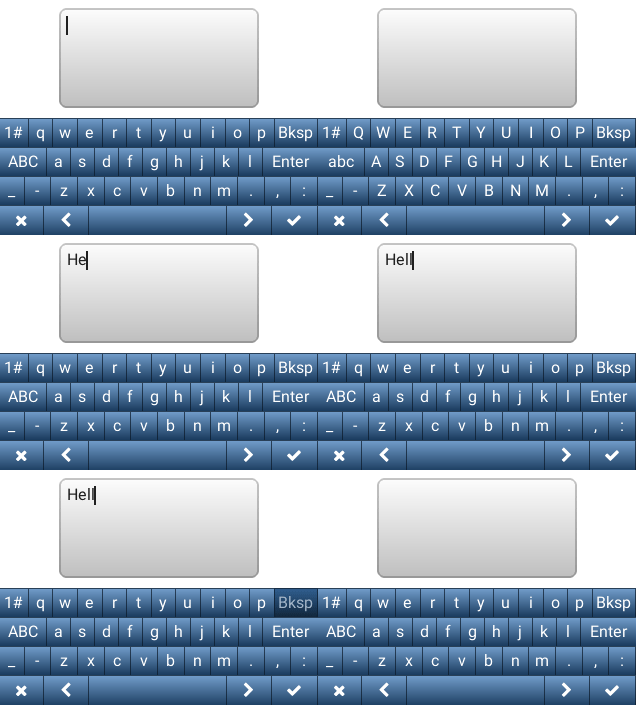
code
#include "lvgl/lvgl.h"

void lv_ex_kb_1(void)
{
    /*Create styles for the keyboard*/
    static lv_style_t rel_style, pr_style;

    lv_style_copy(&rel_style, &lv_style_btn_rel);
    rel_style.body.radius = 0;
    rel_style.body.border.width = 1;

    lv_style_copy(&pr_style, &lv_style_btn_pr);
    pr_style.body.radius = 0;
    pr_style.body.border.width = 1;

    /*Create a keyboard and apply the styles*/
    lv_obj_t *kb = lv_kb_create(lv_scr_act(), NULL);
    lv_kb_set_cursor_manage(kb, true);
    lv_kb_set_style(kb, LV_KB_STYLE_BG, &lv_style_transp_tight);
    lv_kb_set_style(kb, LV_KB_STYLE_BTN_REL, &rel_style);
    lv_kb_set_style(kb, LV_KB_STYLE_BTN_PR, &pr_style);

    /*Create a text area. The keyboard will write here*/
    lv_obj_t *ta = lv_ta_create(lv_scr_act(), NULL);
    lv_obj_align(ta, NULL, LV_ALIGN_IN_TOP_MID, 0, 10);
    lv_ta_set_text(ta, "");

    /*Assign the text area to the keyboard*/
    lv_kb_set_ta(kb, ta);
}
MicroPython
Keyboard with text area
code
# Create styles for the keyboard
rel_style = lv.style_t()
pr_style  = lv.style_t()

lv.style_copy(rel_style, lv.style_btn_rel)
rel_style.body.radius = 0
rel_style.body.border.width = 1

lv.style_copy(pr_style, lv.style_btn_pr)
pr_style.body.radius = 0
pr_style.body.border.width = 1

# Create a keyboard and apply the styles
kb = lv.kb(lv.scr_act())
kb.set_cursor_manage(True)
kb.set_style(lv.kb.STYLE.BG, lv.style_transp_tight)
kb.set_style(lv.kb.STYLE.BTN_REL, rel_style)
kb.set_style(lv.kb.STYLE.BTN_PR, pr_style)

# Create a text area. The keyboard will write here
ta = lv.ta(lv.scr_act())
ta.align(None, lv.ALIGN.IN_TOP_MID, 0, 10)
ta.set_text("")

# Assign the text area to the keyboard
kb.set_ta(ta)