C
Simple Arc
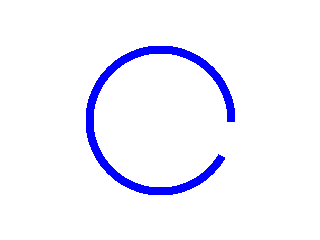
code
#include "lvgl/lvgl.h"

void lv_ex_arc_1(void)
{
  /*Create style for the Arcs*/
  static lv_style_t style;
  lv_style_copy(&style, &lv_style_plain);
  style.line.color = LV_COLOR_BLUE;           /*Arc color*/
  style.line.width = 8;                       /*Arc width*/

  /*Create an Arc*/
  lv_obj_t * arc = lv_arc_create(lv_scr_act(), NULL);
  lv_arc_set_style(arc, LV_ARC_STYLE_MAIN, &style);          /*Use the new style*/
  lv_arc_set_angles(arc, 90, 60);
  lv_obj_set_size(arc, 150, 150);
  lv_obj_align(arc, NULL, LV_ALIGN_CENTER, 0, 0);
}
Loader with Arc

code
#include "lvgl/lvgl.h"

/**
 * An `lv_task` to call periodically to set the angles of the arc
 * @param t
 */
static void arc_loader(lv_task_t * t)
{
    static int16_t a = 0;

    a+=5;
    if(a >= 359) a = 359;

    if(a < 180) lv_arc_set_angles(t->user_data, 180-a ,180);
    else lv_arc_set_angles(t->user_data, 540-a ,180);

    if(a == 359) {
        lv_task_del(t);
        return;
    }
}

/**
 * Create an arc which acts as a loader.
 */
void lv_ex_arc_2(void)
{
  /*Create style for the Arcs*/
  static lv_style_t style;
  lv_style_copy(&style, &lv_style_plain);
  style.line.color = LV_COLOR_NAVY;           /*Arc color*/
  style.line.width = 8;                       /*Arc width*/

  /*Create an Arc*/
  lv_obj_t * arc = lv_arc_create(lv_scr_act(), NULL);
  lv_arc_set_angles(arc, 180, 180);
  lv_arc_set_style(arc, LV_ARC_STYLE_MAIN, &style);
  lv_obj_align(arc, NULL, LV_ALIGN_CENTER, 0, 0);

  /* Create an `lv_task` to update the arc.
   * Store the `arc` in the user data*/
  lv_task_create(arc_loader, 20, LV_TASK_PRIO_LOWEST, arc);

}
MicroPython
Simple Arc
code
# Create style for the Arcs
style = lv.style_t()
lv.style_copy(style, lv.style_plain)
style.line.color = lv.color_make(0,0,255) # Arc color
style.line.width = 8                      # Arc width

# Create an Arc
arc = lv.arc(lv.scr_act())
arc.set_style(lv.arc.STYLE.MAIN, style)   # Use the new style
arc.set_angles(90, 60)
arc.set_size(150, 150)
arc.align(None, lv.ALIGN.CENTER, 0, 0)
Loader with Arc
code
# Create an arc which acts as a loader.
class loader_arc(lv.arc):

    def __init__(self, parent, color=lv.color_hex(0x000080),
                       width=8, style=lv.style_plain, rate=20):
        super().__init__(parent)

        self.a = 0
        self.rate = rate

        # Create style for the Arcs
        self.style = lv.style_t()
        lv.style_copy(self.style, style)
        self.style.line.color = color
        self.style.line.width = width

        # Create an Arc
        self.set_angles(180, 180);
        self.set_style(self.STYLE.MAIN, self.style);

        # Spin the Arc
        self.spin()

    def spin(self):
        # Create an `lv_task` to update the arc.
        lv.task_create(self.task_cb, self.rate, lv.TASK_PRIO.LOWEST, {})


    # An `lv_task` to call periodically to set the angles of the arc
    def task_cb(self, task):
        self.a+=5;
        if self.a >= 359: self.a = 359

        if self.a < 180: self.set_angles(180-self.a, 180)
        else: self.set_angles(540-self.a, 180)

        if self.a == 359:
            self.a = 0
            lv.task_del(task)

# Create a loader arc
loader_arc = loader_arc(lv.scr_act())
loader_arc.align(None, lv.ALIGN.CENTER, 0, 0)